GB-14
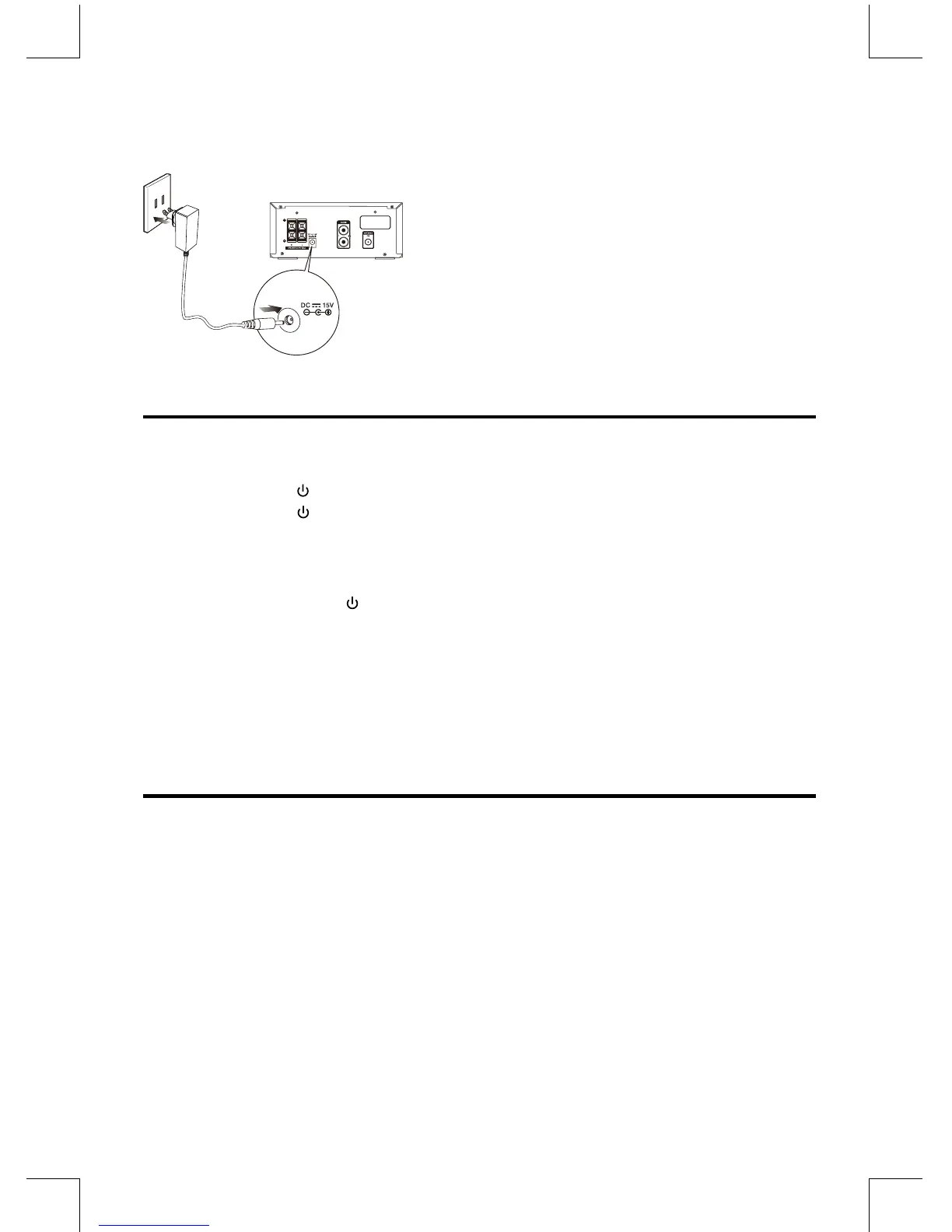
Connecting the AC Adaptor
Insert the AC adapter cord into unit and other side
into a wall outlet, then your unit is ready to use.
Caution:
* Be sure to unplug the AC adapter plug from the
outlet when going out or when the unit is not in
use for an extended period of time.
ECO-Power/Standby Features
Switching ON / OFF
WhenyourstconnecttheunittotheDCJack,theunitwillbeinstandbymode.
• Pressthe standby button to switch the unit on. The word “HELLO” will show in the display.
• Pressthe standby button to switch the unit back to standby mode. The words “BYE BYE”
will scroll across the display.
Switching the system to ECO Power/Standby mode
Press and hold the standby button for 2 seconds or more to switch to ECO Power Standby
or normal standby.
* ECO Power standby mode
The clock will not be displayed. Press the CLOCK button to display the clock on the LCD.
* Normal standby mode
The clock display on the LCD.
Setting the Clock
Setting the Clock Manually
Caution: You can set the clock in standby mode only.
1. In standby mode, press and hold the CLOCK button, the VFD will display CLOCK SET and
CLOCK 12 begins to blink.
2. Set the 12/24 hour format with the VOL- or VOL+ button.
3. Press the CLOCK button, hour indicator will blink.
4. Set the hour with the VOL- or VOL+ button.
5. Press the CLOCK button, minute indicator will blink.
6. Set the minute with the VOL- or VOL+ button.
7. Press the CLOCK button, the built-in clock starts operating.
Note:
• Toexitclocksettingmodewithoutstoring,pressthe
L
button.
• Ifnobuttonispressedin90seconds,theunitexitsclocksettingmodeautomatically.


 To Next Page