- 16 -
Use the USB
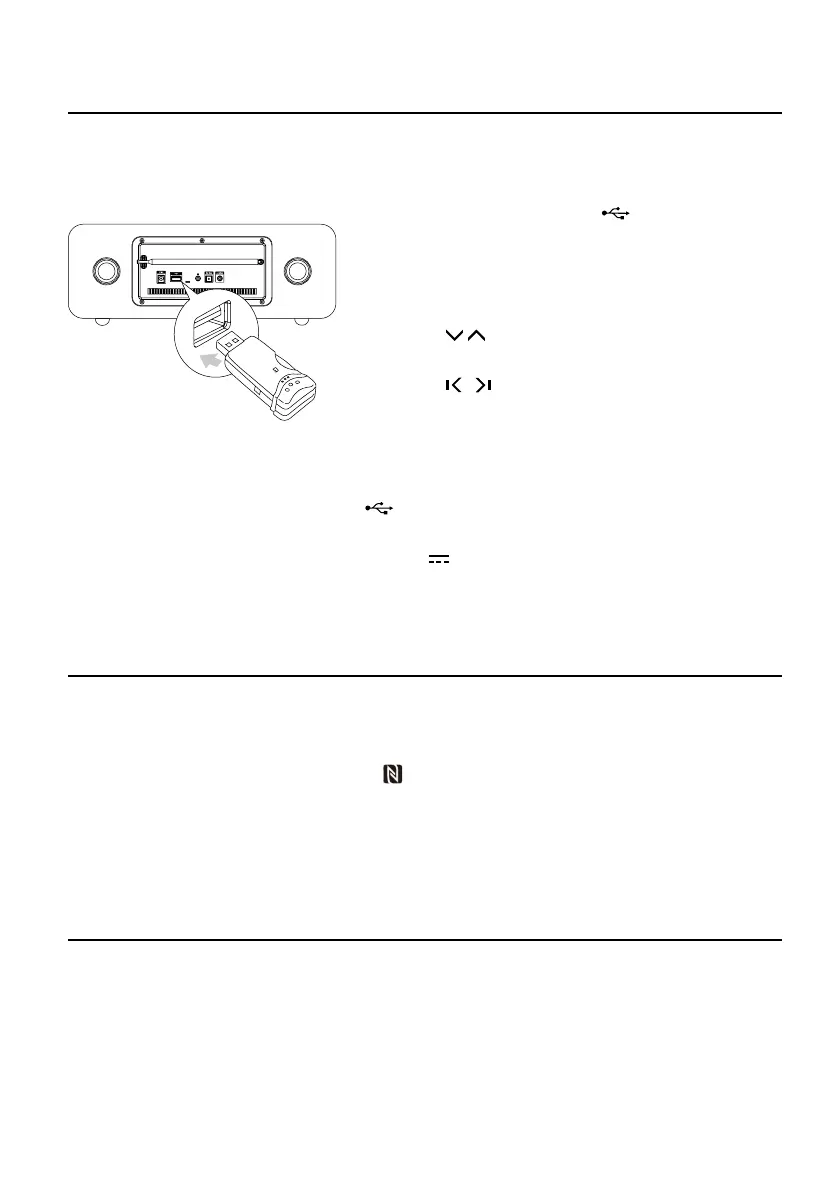
Play from USB
Note: Ensure that the USB device contains playable audio contents for supported formats.
1. Insert the USB device into the socket on the rear
of the unit.
2.
Repeatedly press the
SOURCE
button to select USB
source. The word “USB” will display on the display lens.
3. The device's stored music will be played automatically.
4. Press the / buttons on the remote control to
select the next/previous folder.
5. Press the
/ buttons on the remote control to
select a file.
6. Press the
BF
button to start play.
Charge your device
You can charge your device through the socket on this product with a USB cable.
Note:
* The maximum current for USB charging is 5V
1A.
* Not all devices for USB charging are guaranteed.
About NFC
Pair your NFC(Near Field Communication)-enabled mobile device directly with this unit by just a
single tap.
1. Activate NFC on your mobile device.
2. Tap the mobile device on the NFC area
of the unit.
3. Operate your mobile device directly for playback features.
4. Tap again on the NFC area of the unit to disconnect.
Note: This function only works with mobile devices that support NFC technology.
Play from Bluetooth device
1.
Repeatedly press the
SOURCE
button to select Bluetooth source. The word “BT” will display on
the display lens.
2. Activate the Bluetooth function in your Bluetooth device (see the device user manual).
3. Select "MTB830" on your device for pairing.
- For elder devices, you need to input “0000” as pairing password.
4. Start music play on your Bluetooth device, you can use this unit to control the function to
your Bluetooth device.


 To Next Page