- 18 -
To deactivate or re-activate an alarm timer
Repeatedly press the
TIMER
button to activate or deactivate timer.
- If timer is activated, “
” is displayed.
Other features
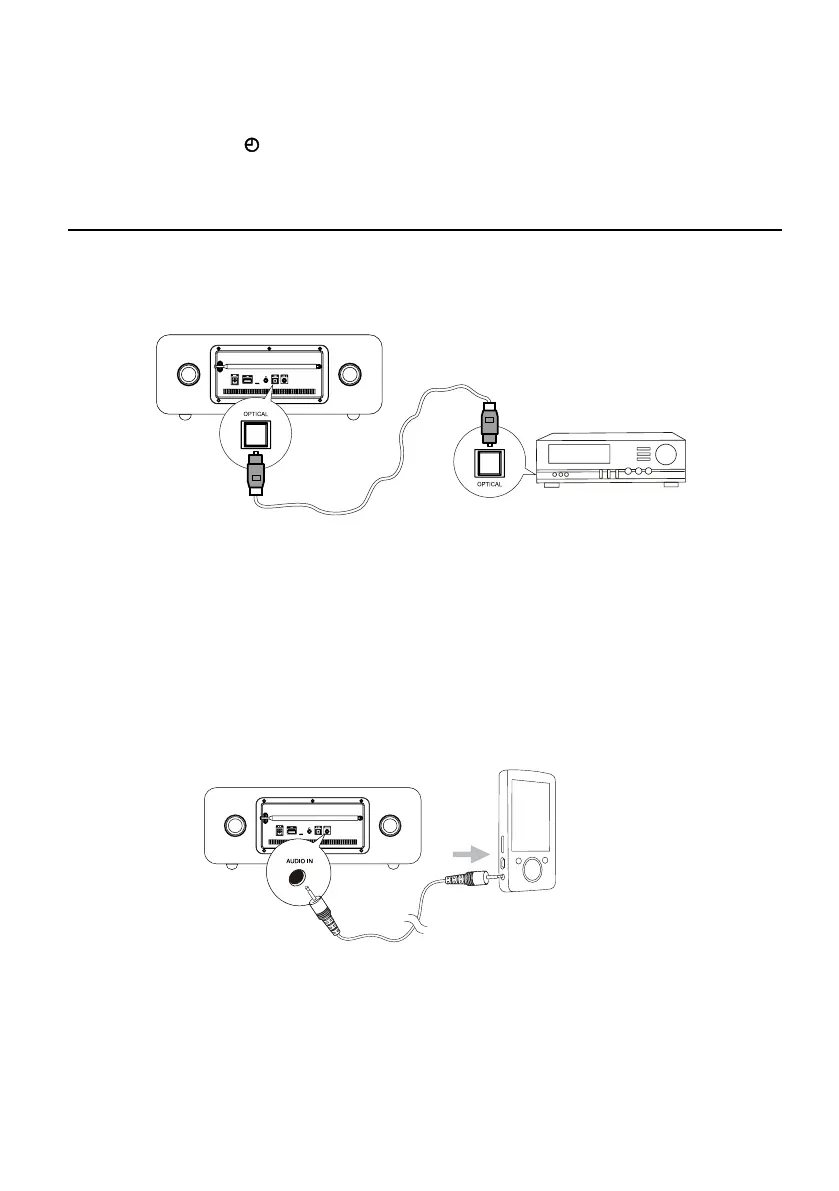
Optical
1. Connect the OPTICAL socket on the rear of the unit to OPTICAL socket on the amplifier
with digital signal input socket with the signal cable.
2. Repeate
dly press the
SOURCE
button to select the OPTICAL source.
3. Start to play on the device (see the user manual of the external device).
Note:
In receiving OPTICAL signals, the setting menu of TV or other connected devices, please change
Digital Audio Output into PCM.
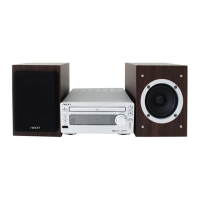
AUDIO IN
1. Connect the AUDIO IN terminals on the rear of the unit to the headphone socket on the
external device with the MP3-LINK cable.
2.
Repeatedly press the
SOURCE
button to select
AUDIO IN
source. The word “
AUDIO IN
” will
display on the display lens.
3. Start to play on the device (see the user manual of the external device).


 To Next Page