- 8 -
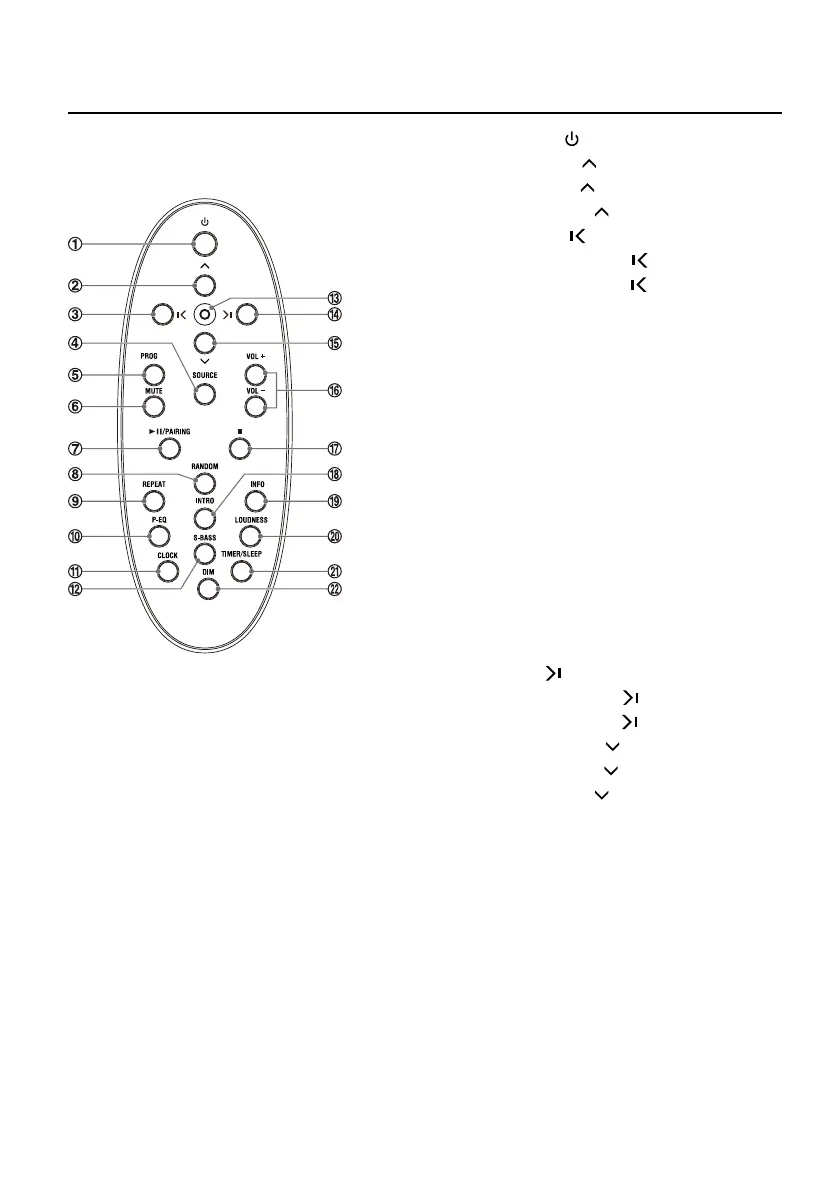
Remote Control Overview
1. Standby Button ( )
2. Album Up Button (
)
Preset Up Button (
)
Adjust Time Button (
)
3. Previous Button ( )
Search Backward Button ( )
Tuning Backward Button ( )
4. Source Select Button (
SOURCE
)
5. Program Button (
PROG
)
Auto Scan Button (
PROG
)
Memory Button (
PROG
)
6. Mute Button (
MUTE
)
7. Play/Pause Button (
BF
)
Disable the Bluetooth Function Button
(
PAIRING
)
8. Random Button (
RANDOM
)
9. Repeat Button (
REPEAT
)
Stereo/mono Select Button (
REPEAT
)
10. Preset Equalizer Button (
P-EQ
)
11. Clock Button (
CLOCK
)
12. Super Bass Button (
S-BASS
)
13. Eject the disc Button
14. Next Button ( )
Search Forward Button ( )
Tuning Forward Button ( )
15. Album Down Button ( )
Preset Down Button ( )
Adjust Time Button ( )
16. Volume Up Button (
VOL +
)
Volume Down Button (
VOL -
)
17. Stop Button (
L
)
18. Intro Button (
INTRO
)
19. Display Information Button (
INFO
)
20. Loudness Button (
LOUDNESS
)
21. Timer Button (
TIMER
)
Sleep Button (
SLEEP
)
22. Dimmer Button (
DIM
)


 To Next Page