10
Nera ISDN Handset
USER GUIDE
Mar 01 00:09
20
ALPHA
Store (33%)...
004767244700
ALPHA
N_
0047672 [M_O0Ö6]
ALPHA
Ne_
00476724 [d_f3]
ALPHA
Ner_
0047672 [pq_s7]
ALPHA
Nera_
00476 [abcæåä2]
ALPHA
Nera _
0047672447 [_0]
ALPHA
Nera _A
00476 [ABCÆÅÄ2]
ALPHA
Nera _AS
0047672 [PQRS7]
#
A a
#
A a
2
abc
7
pqrs
0
2
abc
7
pqrs
3
def
6
mno
ALPHA
Nera _ASA
00476 [ABCÆÅÄ2]
2
abc
Additional key
characters
OK
ALPHA
?...
004767244700
Please dial
004767244700
6
mno
2
abc
0 0
7
pqrs
7
pqrs
4
abc
4
abc
0 4
abc
7
pqrs
0
0
7
pqrs
3
def
6
mno
1
2
abc
4
abc
5
jkl
8
tuv
9
wxyz
. , ? ! - : ; / 1 . , ? ! - : ; / 1
ABCÆÅÄ2 abcæåä2
DEF3 def3
GHI4 ghi4
JKL5 jkl5
MNOØÖ6 mnoøö6
PQRS7 pqrs7
TUVÜ8 tuvü8
WXYZ9 wxyz9
_0 _0
Key Uppercase Lowercase
OPERATION CONT’D
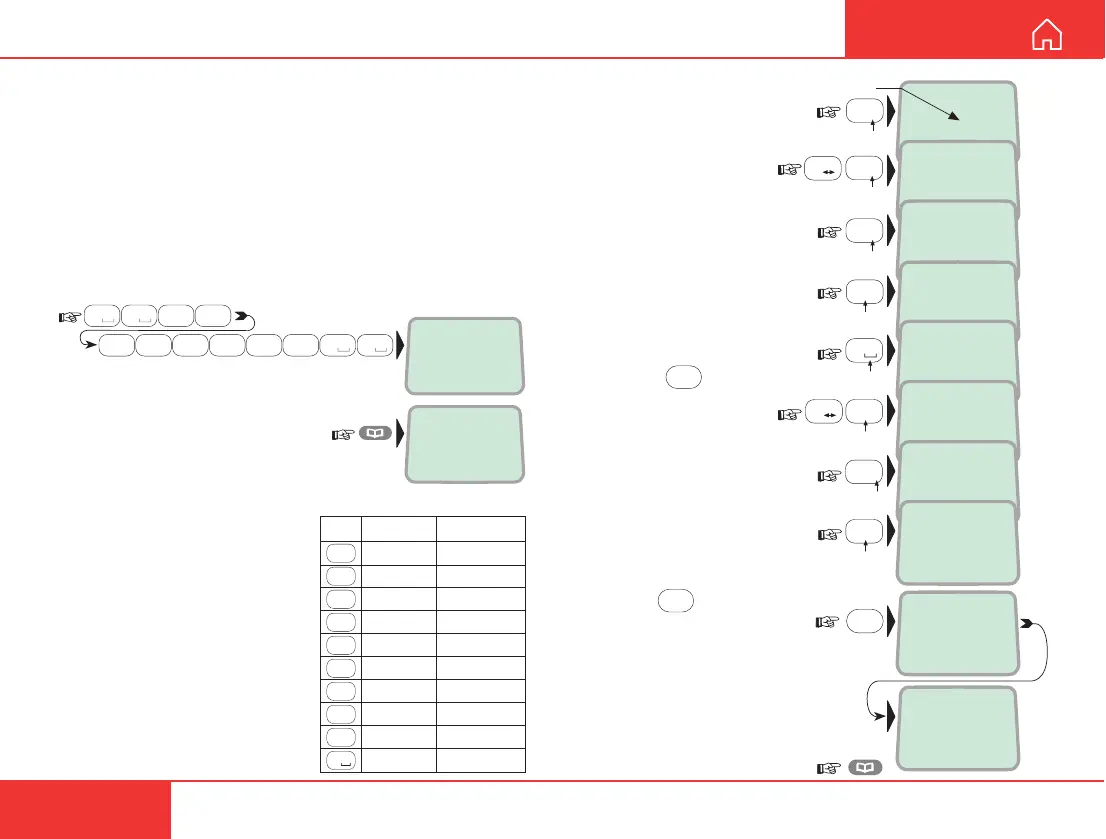
Phone book entry
The entries in the ISDN Handset phone book may
consist of maximum 15 characters and 20 digits.
Typical 6-character/8-digit entries yield a total of 85
phone numbers (34 for maximum number of charac-
ters and digits). The number/name list is retained
when disconnecting the handset.
Programming:
1 Dial the phone number, e.g.:
and press the phone book key
to enter the dialed number in
the phone book:
The phone book is not merged with the
internal WorldCommunicator phone book.
The character table shows all
the characters accessible:
Notes:
• The # -key toggles between
upper-case and lower-case
characters.
• The
*
-key ends the 1-sec
delay after every key entry.
• Names written with none
Anglo-American characters
such as Æ, Ø, Å etc., can only
contain 6 different special
characters (however, 2 equal
characters count as 1).
2 Enter the name,
e.g. Nera ASA:
Note that the additional
characters accessible
with the key appear
momentarily.
See the character table.
An entry can only be
edited by reprogram-
ming.
An entry can be erased
by pressing:
DEL
3 Pressing
OK
stores
the entry in the phone book:
The percentage indicates the
memory capacity remaining
as the entry is being stored.
"Memory full" is displayed
when capacity is exhausted.
Revert to idle:



 To Next Page