15
Nera ISDN Handset
USER GUIDE
4.8 Speech
20 #1
>Active MSN
Keyclick
Language
>MSN
OK
MENU
Clear?
20 #1
DEL
OK
#1
21 #1
?...
21 #1
OK
>#1: 20
#2: 30
#3: 40
OK
ALPHA
MENU FUNCTIONS CONT’D
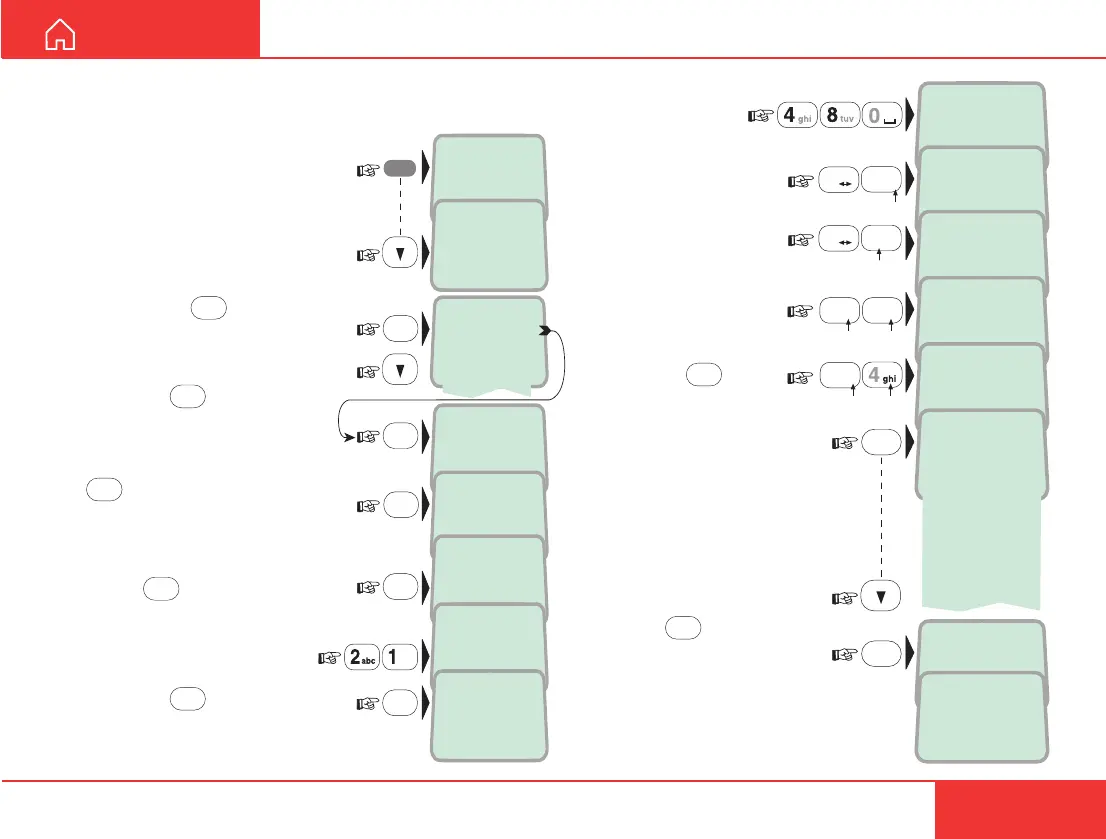
MSN programming
The Nera ISDN Handset can be
programmed with 3 different MSN
numbers:
1 Open the MENU and scroll
down to the MSN function:
2 Pressing
OK
lists the 3
handset MSNs:
Scroll down to select:
Pressing
OK
shows the
name and MSN for the
selected handset identity:
To modify, start by pressing
DEL
to delete both name and
number:
Press
OK
to erase:
3 Key in the new
MSN number:
Pressing
OK
stores
the new MSN and
prompts for the name,
see next step:
Store ...
OK
ALPHA
48 _
21
ALPHA
48 S_
21
ALPHA
48 Sp_
21
ALPHA
48 Spee_
21
#
A a
2
abc
7
pqrs
3
def
48 Speech_
21
OK
>Tone#1
Tone#2
Tone#3
Tone#4
Tone#5
Tone#6
Tone#7
Tone#8
Tone#9
7
pqrs
#
A a
3
def
ALPHA
May 01 09:15
48 Speech
4 Enter the name to be
displayed in IDLE:
5 Pressing
OK
allows
selecting the tone that
should sound when a call is
received to that name/MSN:
Pressing
OK
stores the
chosen tone:



 To Next Page