4
Nera ISDN Handset
USER GUIDE
M
EN
U
>Start S
earch
Lock term
inal
52 0 05:46
U
S
B
R
S
-2
32
IS
D
N
Nera ISDN
Handset
7
p
q
r
s
4
ghi
1
3
def
6
m
n
o
9
w
y
z
DEL
2
abc
5
j
k
l
8
t
u
v
0
OK
Telenor IOR
Ready for call
IS
D
N
INTRODUCTION
General
The Nera ISDN Handset is specially designed and
approved to work with the Nera WorldCommunicator
satellite terminal, as well as other Nera ISDN compat-
ible products.
The handset should not be used with other types of
equipment or on the terrestrial network.
Installation
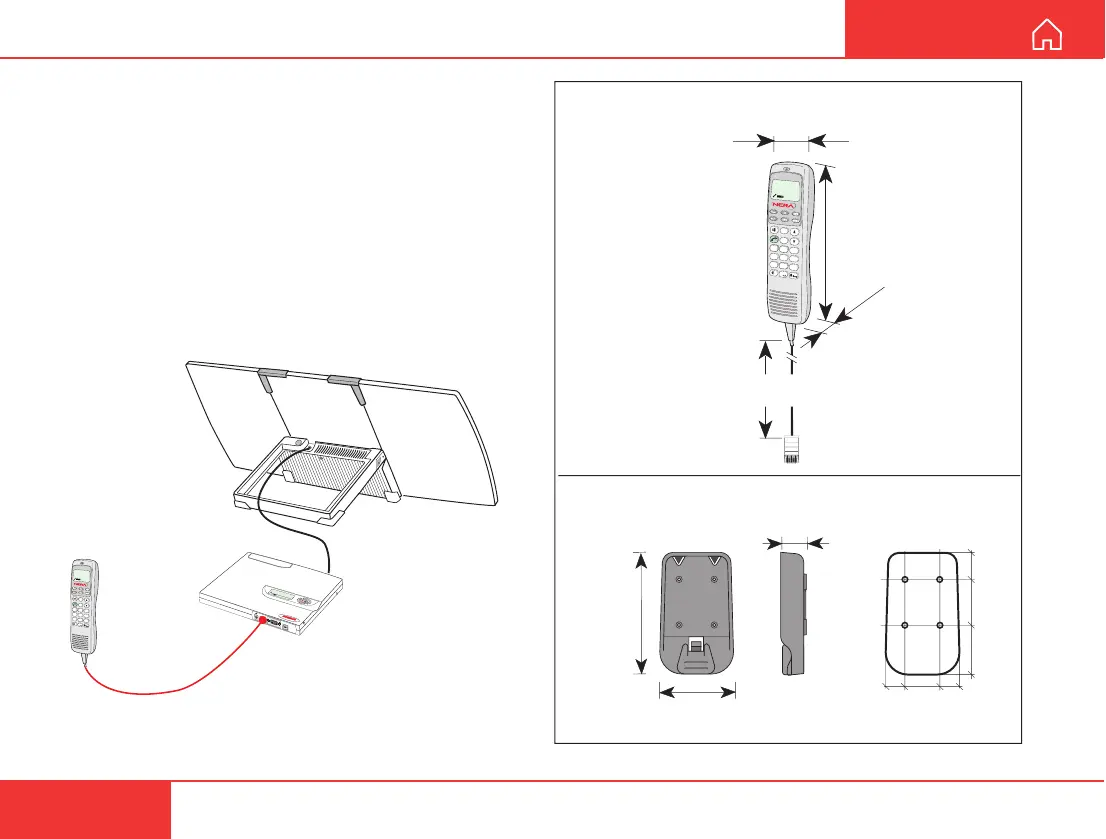
The Nera ISDN Handset is operative once it has been
plugged into the ISDN connector on the terminal.
Figure 2 Outline dimensions and weights.
22.5
40
37.5
15 1530
Handset holder/cradle
QSXA 911 394
Weight: 0.06 kg
61 mm
22 mm
100 mm
Nera ISDN Handset
101654
56 mm
215 mm
RJ45
7
pqrs
4
ghi
1
3
d
e
f
6
m
n
o
9
wyz
DEL
2
abc
5
jkl
8
tuv
0
OK
Telenor IOR
Ready for call
ISDN
45
mm
Coiled cord
0.5 - 2m
Weight: 0.3 kg
Figure 1 The Nera ISDN Handset connected to the
Nera WorldCommunicator Modem Unit.



 To Next Page