12
Nera ISDN Handset
USER GUIDE
Ringer
The tone sound and level
heard when the phone rings
may be selected as follows:
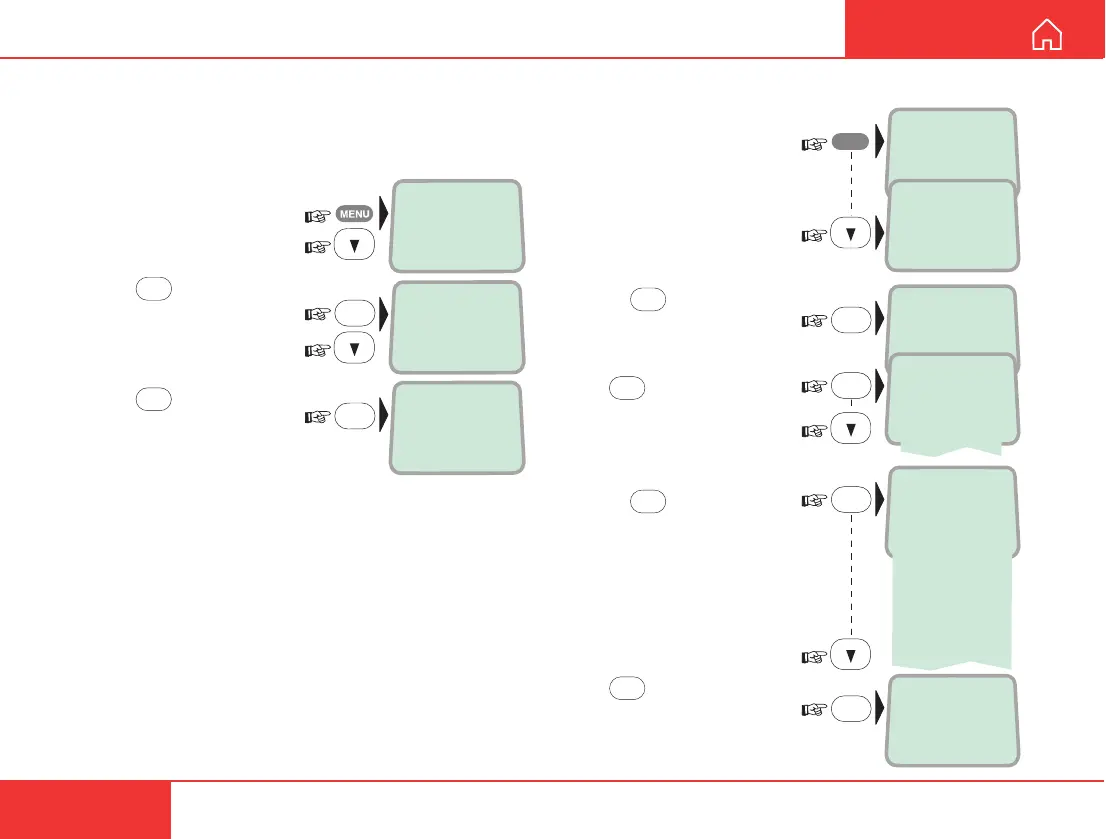
1 Open the MENU and scroll
down to the Ringer function:
2 Press
OK
to select the
Ringer function:
Press
OK
again and scroll
down to check the sound
for each handset identity:
4 Press
OK
, and
- for each handset identity -
scroll down to select tone:
Press
OK
to store the
selected tone:
To set ringing Volume,
see next page:
>Active MSN
Keyclick
Keyclick
>Ringer
Store ...
OK
>Tone
Volume
OK
OK
>Tone#1
Tone#2
Tone#3
Tone#4
Tone#5
Tone#6
Tone#7
Tone#8
Tone#9
MENU
>4.8 Speech
64K Speech
64K Audio
OK
Keyclick
When activated, a click is heard when pressing a key.
The keyclick can be turned on/off as follows:
1 Open the MENU and
scroll down to the
Keyclick function:
2 Press
OK
and scroll
down to On or Off, as
required:
3 Press
OK
to store the
setting:
>Active MSN
Keyclick
OK
>On
Off
Store ...
OK
MENU FUNCTIONS CONT’D



 To Next Page