7
Nera ISDN Handset
USER GUIDE
ALPHA
?...
ALPHA
N...
6
mno
ALPHA
B...
ALPHA
BT
0044222534555
2
abc
ALPHA
Nera
004767244700
LIST
LIST
Calling...
0044222534555
OPERATION CONT’D
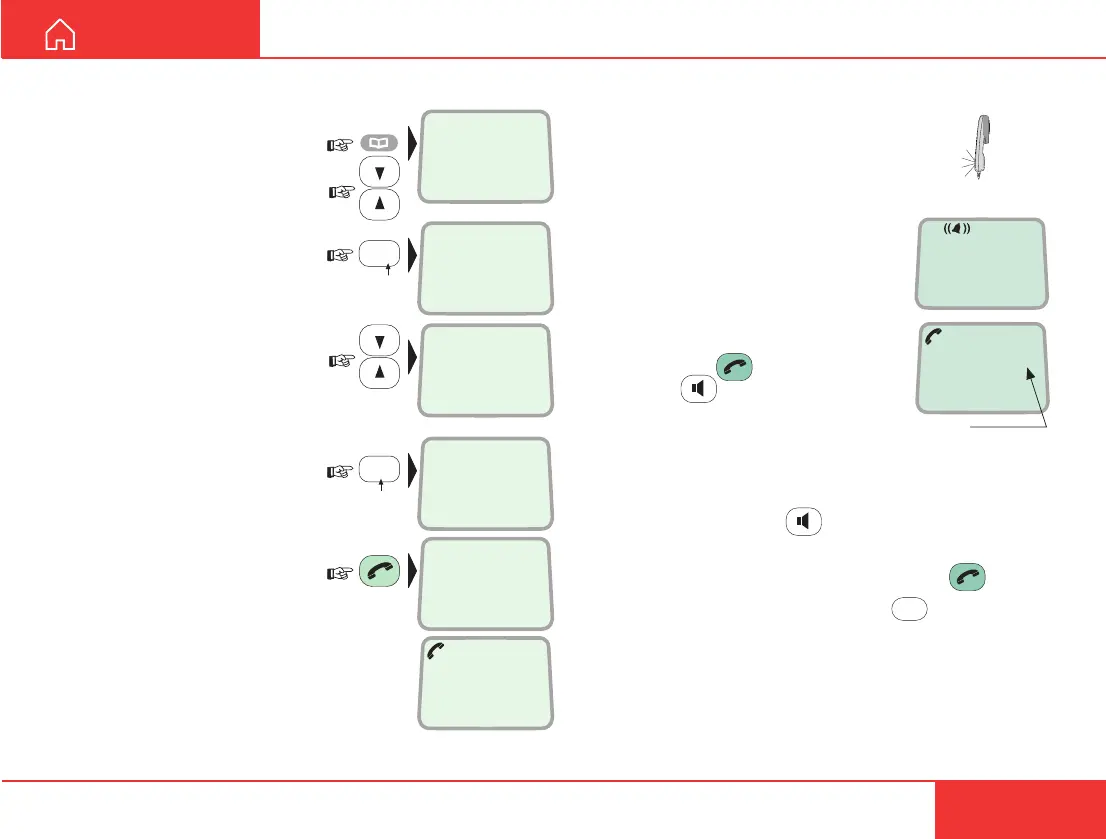
Dialing from phone book
1 Press the phone book
key:
Scroll through the phone
book, or
press the first letter of the
subscriber name, e.g. n:
The first entry starting with N
appears after one second:
For further searching, scroll
up/down as required, or
press the first letter of the
next subscriber, e.g. b:
2 Press the hook key to
call the selected number:
Incoming calls
The handset rings when receiving a call.
The ringing symbol flashes until the call
is answered. The ringing tone may vary
with the incoming number, depending
on the tone assigned to the local
Multiple Subscriber Number, see
MSN programming later in this
manual.
• Answer the call by pressing
hook ON/OFF:
or
handsfree:
With the ISDN Handset in the cradle,
the loudspeaker and microphone are
ON for handsfree operation.
If lifting the handset, the loudspeaker turns OFF.
Use the handsfree key
to toggle the loud-
speaker ON/OFF.
• End the call by pressing hook ON/OFF .
• Reject the call by pressing DEL:
DEL
Internal communication
When receiving a call, the caller`s MSN number will
appear in the display (if programmed).
See “
Making a call” in Getting Started / User
Manual
of the connected satellite terminal.
4.8 Speech
00:00
Timer,
minutes:seconds



 To Next Page