25
EN
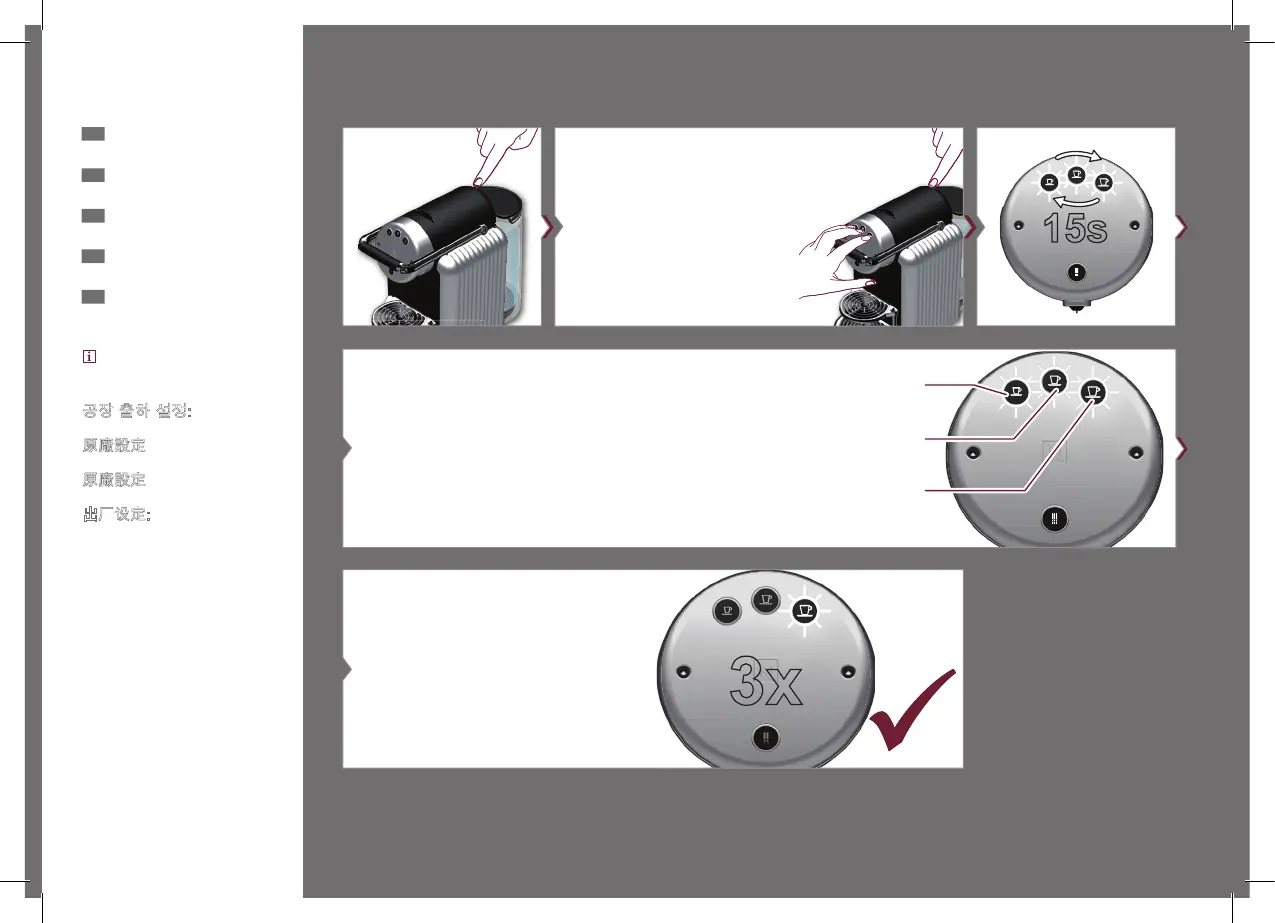
Programming the coee
temperature
KR
커피 온도 설정하기
HK
預設咖啡溫度
TW
咖啡溫度設定
CN
设定咖啡温度
1
OFF
Factory setting:
• Medium temperature
공장 출하 설정:
• 중간 온도
原廠設定
• 中等溫度
原廠設定
• 適溫
出厂设定:
• 适中水温
4
To programm coee temperature, press
during blinking cycle.
버튼이 깜빡이는 동안 버튼을 눌
러 커피 온도 설정을 선택하십
시오.
圓圈閃亮時按鍵以預設咖啡溫
度。
咖啡機開始閃爍,選擇溫度調
整。
进行咖啡温度设定,请在按键闪烁
时操作
5
Confirmation of selection. Example for high
temperature setting.
선택 확인. 높은 온도로 설정한 예.
確定選擇 選擇高溫設定例子。
確認選擇 以選擇溫度較高設定為例。
确认设置. 以高温设定为例
2
ON
Press and hold all 3 coee buttons
while turning on the machine.
3개의 커피 버튼을 누르고 있
습니다.
當啟動咖啡機時,同時按著三
款咖啡按鈕。
按住3個咖啡按鈕同時打開咖
啡機電源。
开机时按住3个咖啡按键。
3
Low temperature / 낮은 온도 / 低溫度 /
溫度較低 / 低温度 /
Medium temperature / 중간 온도 / 中等溫度
/適溫 / 适中温度 /
High temperature / 높은 온도 / 高溫度 /
溫度較高 / 高温 /
_ZENIUS_UM_ZONE3.indb 25 14.11.14 10:11






 To Next Page