◦ The NVRAM status LED flashes when the controller module is removed from the chassis and could
mean the controller module is not taken over or halted properly (uncommitted data). Confirm that the
controller module has been cleanly takeover by the partner controller module or the impaired controller
module shows
waiting for giveback. Then, the flashing LED can be ignored (and the controller
module can be removed from the chassis).
3. If you are not already grounded, properly ground yourself.
4. Unplug the controller module power supply cables from the controller module power supplies (PSU).
If your system has DC power, disconnect the power block from the PSUs.
5. Unplug the system cables and SFP and QSFP modules (if needed) from the controller module, keeping
track of where the cables were connected.
Leave the cables in the cable management device so that when you reinstall the cable management
device, the cables are organized.
6. Remove the cable management device from the controller module.
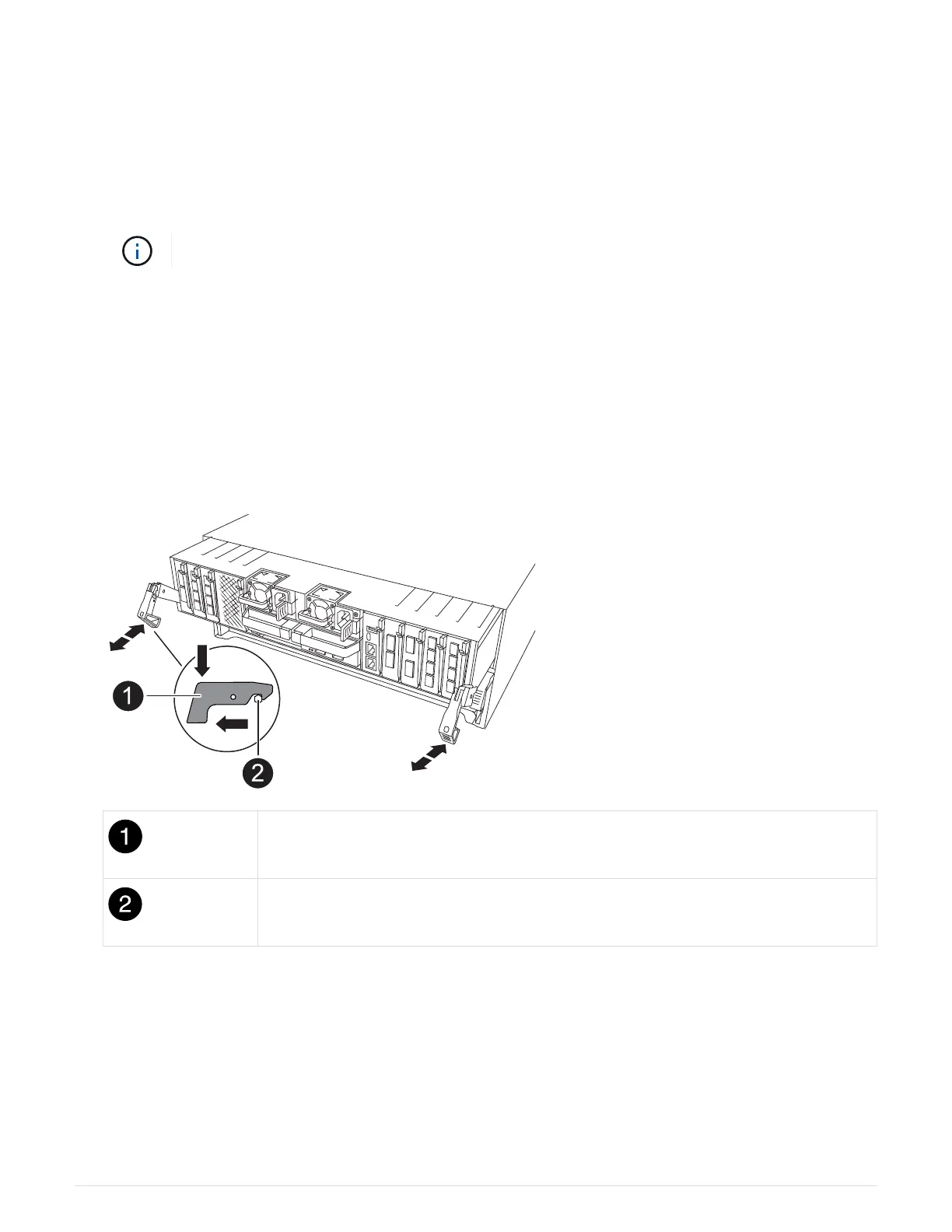
7. Press down on both of the locking latches, and then rotate both latches downward at the same time.
The controller module moves slightly out of the chassis.
a Locking latch
Locking pin
8. Slide the controller module out of the chassis and place it on a flat, stable surface.
Make sure that you support the bottom of the controller module as you slide it out of the chassis.
Step 3: Replace the NV battery
Remove the failed NV battery from the controller module and install the replacement NV battery.
70



 To Next Page