Controller module cover locking button
Step 3: Replace the DIMMs
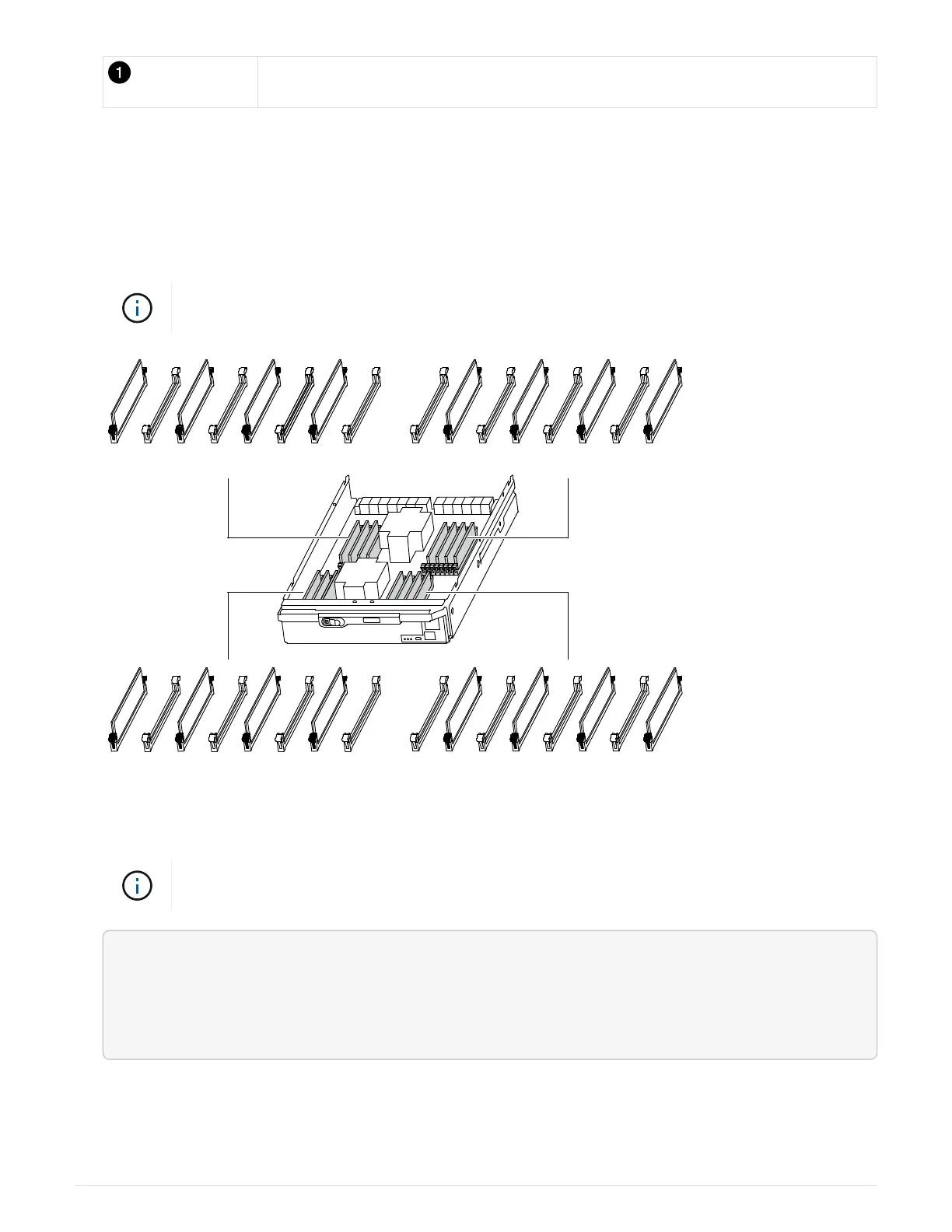
To replace the DIMMs, locate them inside the controller and follow the specific sequence of steps.
1. If you are not already grounded, properly ground yourself.
2. Locate the DIMMs on your controller module.
Each system memory DIMM has an LED located on the board next to each DIMM slot. The
LED for the faulty blinks every two seconds.
1 2 3 4 5 6 7 8 9 10 11 12 13 14 15 16
17 18 19 20 21 22 23 24 25 26 27 28 29 30 31 32
3. Eject the DIMM from its slot by slowly pushing apart the two DIMM ejector tabs on either side of the DIMM,
and then slide the DIMM out of the slot.
Carefully hold the DIMM by the edges to avoid pressure on the components on the DIMM
circuit board.
<div class="aspect-ratio"><iframe frameborder="1" height="400"
scrolling="auto"
src="https://netapp.hosted.panopto.com/Panopto/Pages/embed.aspx?id=d62a4
c7c-8296-4d60-9981-ae78004b36f7" width="711"> </iframe></div>
Animation - Replace DIMM
756



 To Next Page