FS728TP Smart Switch Software Administration Manual
7-18 Monitoring the Switch
v1.1, September 2009
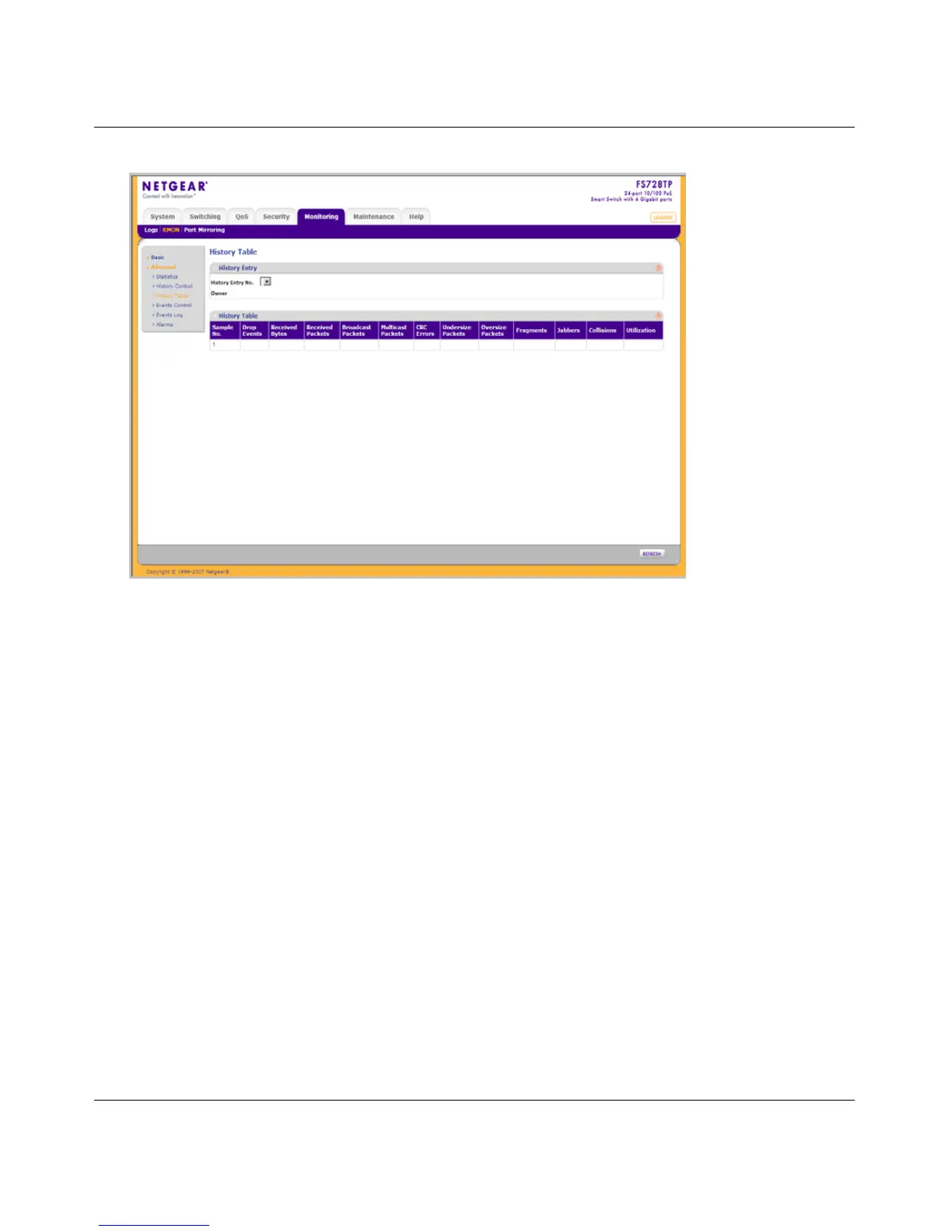
The RMON History Table screen contains the following fields:
History Entry
• History Entry No. – Select the entry number for the History Control Table screen.
• Owner – Displays the RMON station or user that requested the RMON information. The
field range is 0-20 characters.
History Table
• Sample No. – Displays the sample number from which the statistics were taken.
• Drop Events – Displays the number of dropped events that have occurred on the interface
since the device was last refreshed.
• Received Bytes – Displays the number of octets received on the interface since the device
was last refreshed. This number includes bad packets and FCS octets, but excludes
framing bits.
• Received Packets – Displays the number of packets received on the interface since the
device was last refreshed, including bad packets, Multicast, and Broadcast packets.
Figure 7-9






 To Next Page