13
When the fuel bottle is empty, replace it with a full one and continue using the pump (see: section ‘c’ above).
The pump will stop refilling when the fuel tank is full (YOU WILL HEAR A “BEEP”).
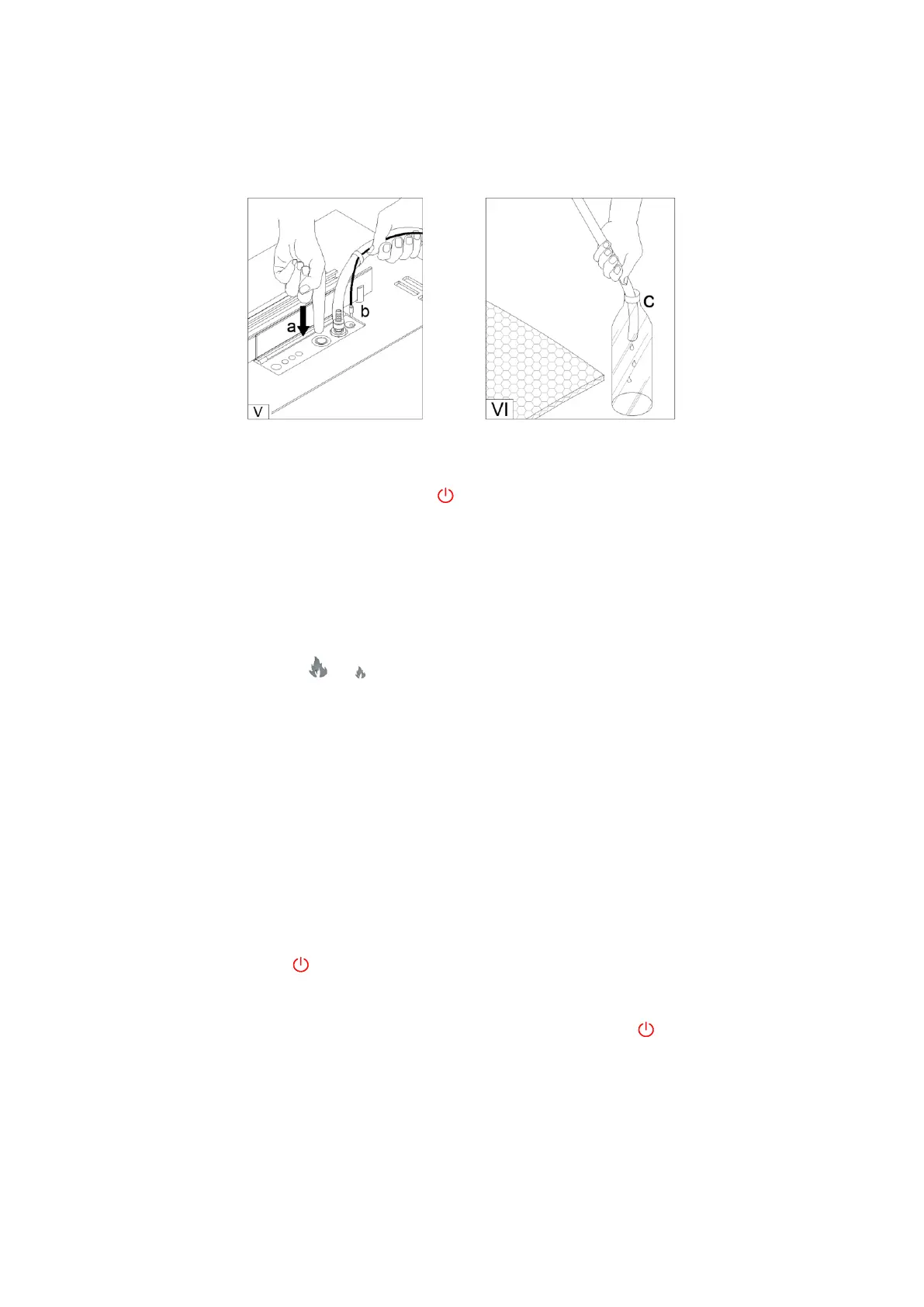
d) Unplug the power cord ‘b’. To unplug the pump, hold the pump inlet ‘a’ and firmly press the release button (V).
e) Shake the remaining fuel from the hose ‘c’ to the container and place the pump in the bag (VI).
5.3 Functions
a) Flame ignition
Open the lid (I) and turn the burner on by pressing .
When the START/STOP button is lit up in green, the burner is ready to be ignited.
Press START/STOP button on the burner or START button on the remote. Ignition of the burner takes from 2 to
10 minutes (FLASHING GREEN LIGHT). When the light stops flashing, the burner has ignited and has reached the
working temperature.
b) Flame height regulation
When the flame is on press the or button on the remote or scroll the flame level bar in the mobile app to
choose one of the six flame heights. The flame starts on height 4 by default.
ATTENTION! If the burner temperature is too high, the flame will be automatically lowered, and the height
regulation blocked. If the temperature keeps increasing, the flame will be extinguished automatically (RED LIGHT).
c) Flame extinguishing
To extinguish the flame press, START/STOP button on the burner or STOP button on the remote. When the flame
is being extinguished, fans within the burner are turned on to speed up the cooling process.
(FLASHING RED LIGHT) indicates the burner is being cooled. Restarting the flame or refueling the burner is possible
only after complete cooldown of the device (GREEN LIGHT).
d) Turning the burner off
To turn the burner OFF, press .
The burner will automatically turn off in case of any work related errors. (FLASHING VIOLET LIGHT WITH ALARM)
indicates that an error has occurred. (check the error in the mobile app). Press to turn the burner OFF/ON to
reset the burner.


 To Next Page