16
6.1 Menu
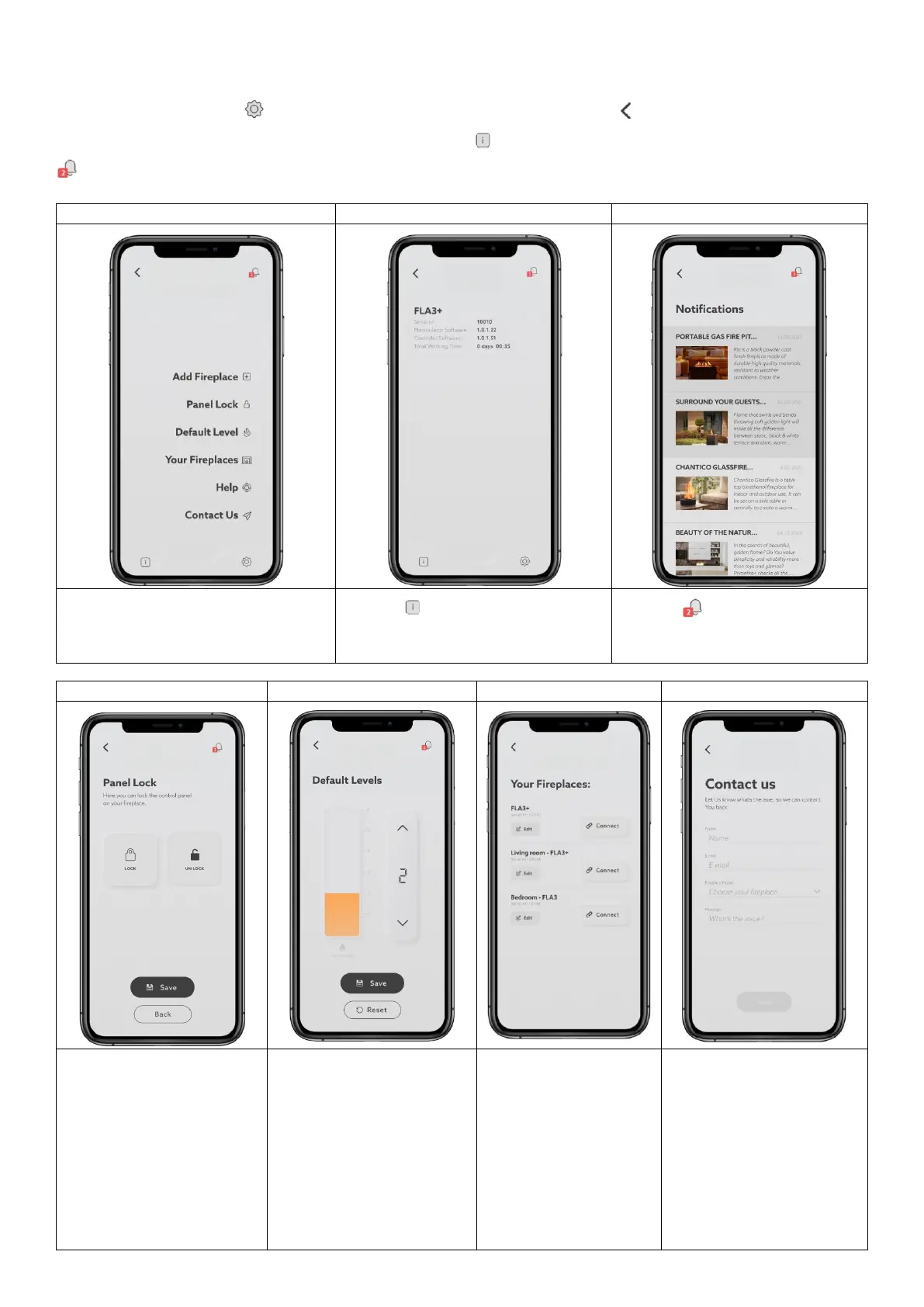
To access menu, press the button. To go back to the main panel, press BACK
To access general information about the fireplace, press the button. The notifications are available by pressing the
button.
Main app setup. Press the tab to change
the settings.
Press the button to check the general
information of the burner.
Press the button to check the
notifications
When the burner is OFF the
control panel can be locked.
Press LOCK to lock the control
panel on the burner.
Press UNLOCK to unlock the
control panel on the burner.
Confirm by clicking SAVE.
Change the default start-up
flame height.
Press SAVE to confirm the
change.
Press RESET to reset your
choice. The default setting of
the flame is height 4.
Check available fireplaces.
Press EDIT to change the
device name.
Press CONNECT to
connect to the device.
Contact us by e-mail.
Press SEND to send us an e-
mail.


 To Next Page