Programming Instructions 62
RNS
®
System User Manual
Creating a Montage
1. Go to the CONFIGURE SETTINGS tab.
2. From the M
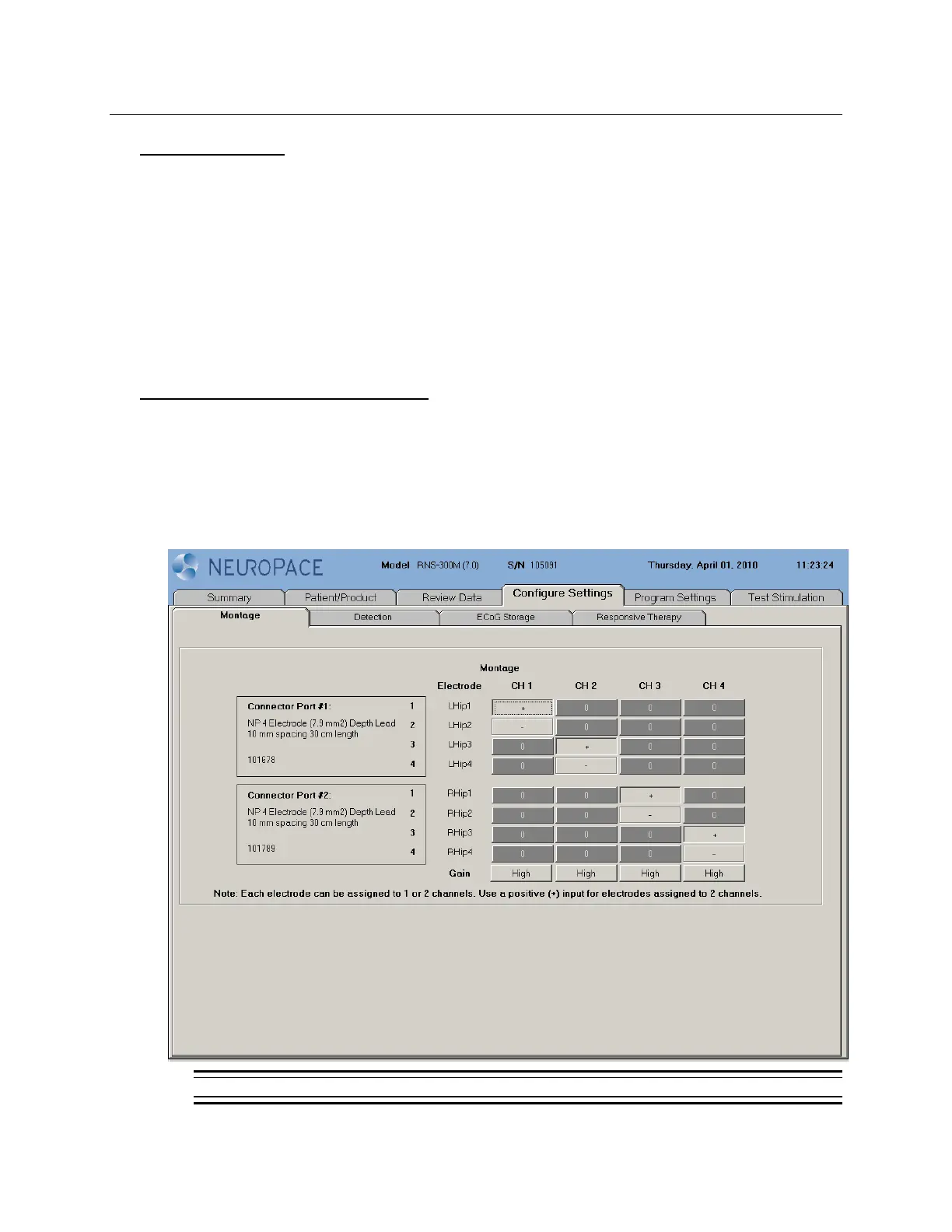
ONTAGE screen, assign an electrode to each CHANNEL (CH1 through CH4) by
selecting either a non-inverting (+) or inverting (-) input. Each electrode can be assigned to
one or two channels. Use a positive (+) input for electrodes assigned to 2 channels.
3. Assign a G
AIN for each channel by selecting a high, medium-high, medium-low, or low value.
The ECoG signal amplification may be assessed following programming by viewing the real-
time ECoGs.
Note: Using a negative (-) input for electrodes assigned to 2 channels may result in ECoG
artifacts.
Recommended Initial Montage settings
Program the initial ECoG sensing montage on the MONTAGE tab as follows:
• CH 1 = Lead 1: Electrode 1 +, Electrode 2 -
• CH 2 = Lead 1: Electrode 3 +, Electrode 4 -
• CH 3 = Lead 2: Electrode 1 +, Electrode 2 -
• CH 4 = Lead 2: Electrode 3 +, Electrode 4 -
• All GAIN settings on “HIGH”
Figure 22: Montage tab



 To Next Page