13
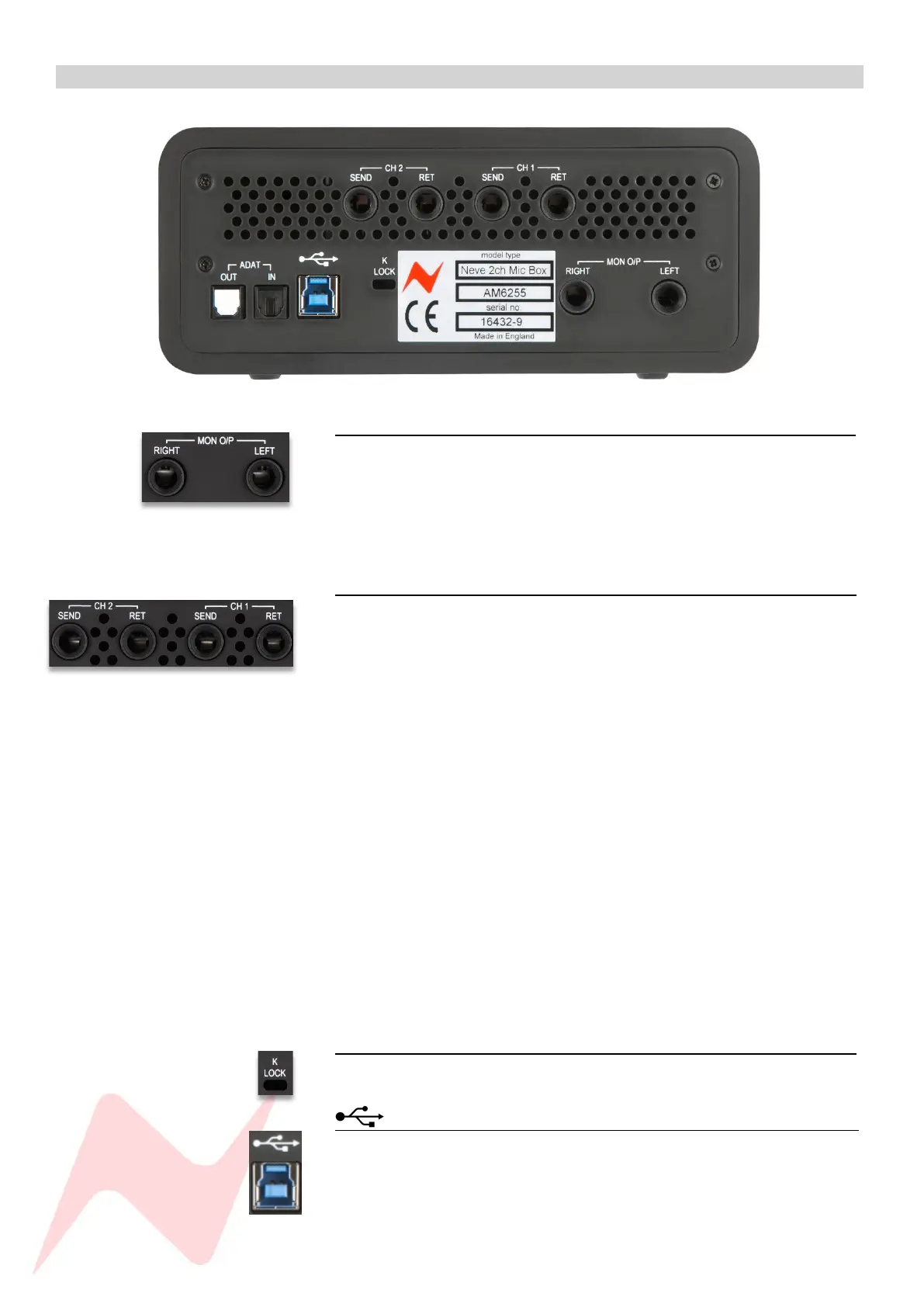
Rear Panel 1
Mon O/P 1
The two TRS outputs labelled LEFT & RIGHT are used to connect to your
studio loudspeakers or speaker amplification system. The stereo main
monitor output is fed into your speakers post monitor level control at a
maximum of +18dBu. The monitor source is selected by pushing the HP
Level pot and toggles through DIR/MIX/DAW/MONO MIX.
CH1/CH2 Inserts 1
The four TRS outputs labelled CH 1/CH 2 SEND/RET are used to connect to
additional analogue hardware units into the 88M preamp signal chain. Each
insert circuit is balanced at +4dBu, providing an ideal connection to
professional equipment.
To create an insert loop
Connect the SEND TRS to the input of external analogue equipment.
Connect the output of the external analogue equipment back into
the RET TRS connection.
Once connected, the complete audio signal chain
• Preamp source (Microphone, Line, Instrument)
• Preamp gain
• Preamp output
• Insert send
• External analogue equipment
• Insert return
• Analogue to digital converter
• DAW input
K LOCK 1
This provides a connection port to secure the unit to a desktop.
1
The USB 3.0 B-type port is used along with the cable provided to connect to
your computer and provides digital audio and power transmission.


 To Next Page