
 Need help?
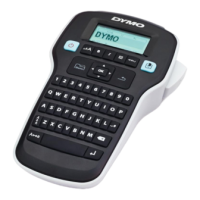
Do you have a question about the newell DYMO LabelManager 160E and is the answer not in the manual?
Guidelines for safe operation of the printer, including battery, power adapter, and label cassette handling.
Configure label width, language, and units of measure upon first printer power-on.
Enter text, choose formatting, print, and prepare the label for use.
Solutions for when the printer display is blank or not showing content.
Steps to resolve issues with unclear or faint printed labels.
Troubleshooting tips for when the cutter is not functioning correctly.
Steps to clear a label jam and ensure the tape path is correct.
 General
| Model | DYMO LabelManager 160E |
|---|---|
| Keyboard Layout | QWERTY |
| Display | LCD |
| Tape Width | 6mm, 9mm, 12mm |
| Printing Technology | Thermal Transfer |
| Maximum Print Width | 12mm |
| Type | Handheld |

 To Next Page