Need help?
Do you have a question about the newell DYMO LabelManager 210D+ and is the answer not in the manual?
Learn how to connect the label maker to power sources, including batteries and AC adapter.
Step-by-step guide to insert the DYMO D1 label cassette correctly into the device.
Explore essential keys like Navigation, CAPS, Shift, NEW, Backspace, Menu, and Cancel for operation.
Add borders, underlines, create two-line labels, align text, and use mirror text formatting.
Guides on resolving issues like no display, poor print quality, tape jams, and character limits.
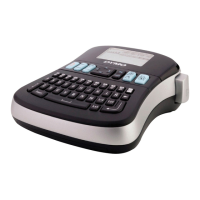
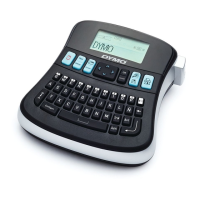
The DYMO LabelManager 210D+ is an electronic label maker designed for creating high-quality, self-adhesive labels for a wide variety of applications. It offers a range of customization options, including different font sizes, styles, and label widths, to suit various labeling needs. The device uses DYMO D1 label cassettes, available in 1/4" (6 mm), 3/8" (9 mm), or 1/2" (12 mm) widths and a variety of colors.
The primary function of the LabelManager 210D+ is to allow users to design and print custom labels. Users can input text, apply various formatting options, and then print the labels. The device features an LCD display that shows up to 13 characters at a time, with feature indicators appearing black when selected. It supports up to 99 characters and spaces per label.
The label maker can be powered by six high-capacity AA alkaline batteries or an optional 9 Volt, 2 Amp AC power adapter. To conserve power, the device automatically turns off after two minutes of inactivity. When powered on, the last created label and previously selected style settings are restored. Upon first use, the label maker guides the user through a setup process to select the language, units of measurement (inches or mm), and the width of the installed tape cassette. These settings remain until changed or the device is reset.
The label maker has a powerful memory feature that allows users to save up to nine frequently-used labels, including their text and formatting. Saved labels can be recalled and inserted into new labels. Users can open saved labels, with a prompt to confirm overwriting current label content if applicable.
The label maker requires minimal maintenance. Regular cleaning helps ensure proper functioning. The cutter blade, which is extremely sharp, should be cleaned each time the label cassette is replaced. To clean the cutter blade, remove the label cassette, press and hold the cutter button to expose the blade, and then clean both sides of the blade with a cotton ball and alcohol.
The user guide provides solutions for common problems such as "No display" (ensure power is on, replace batteries), "Poor Print Quality" (replace batteries/power adapter, ensure cassette is installed, replace cassette, clean print head), "Poor Cutter Performance" (clean cutter blade), "Too many characters" (delete buffer text), "Too many lines" (delete a line, insert wider cassette), "Batteries almost discharged" (replace batteries/connect AC adapter), and "Tape Jam" (remove jammed label, replace cassette, clean cutter blade). For further assistance, DYMO Customer Support can be contacted.
The device is designed with environmental considerations. Users are encouraged to utilize appropriate take-back systems for end-of-life equipment to promote reuse and recycling of materials, minimizing environmental impact. The crossed-bin symbol on the device indicates its suitability for such systems.
 General
| Category | Label Maker |
|---|---|
| Print Technology | Thermal Transfer |
| Maximum Print Width | 12 mm |
| Label Widths Supported | 6 mm, 9 mm, 12 mm |
| Model | LabelManager 210D+ |
| Display | LCD |
| Character Styles | Normal, Bold, Italic, Outline, Shadow |
| Power Source | Batteries or USB |
| Label Material Compatibility | D1 |

 To Next Page