
 Need help?
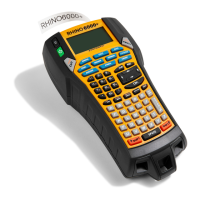
Do you have a question about the newell DYMO RHINO 6000+ and is the answer not in the manual?
Customize text size, style, and create multi-line labels for better label design.
Incorporate international characters, add barcodes, and understand barcode types.
Add symbols and manage barcodes, including QR codes, editing, and hiding text.
Generate series of labels using simple, simultaneous, or advanced serialization.
Create, add to, and remove labels from label files stored in memory.
Learn to print label files, save them to memory, and recall them for editing or printing.
Create labels with a specific, fixed length using the General label type.
Create vertical labels and cable wrap labels with specific properties.
Design flag labels and laminated cable wrap labels for various applications.
 General
| Brand | Newell |
|---|---|
| Model | DYMO RHINO 6000+ |
| Category | Label Maker |
| Type | Industrial |
| Labeling Technology | Thermal Transfer |
| Maximum Print Width | 24 mm |
| Connectivity | USB |
| Cutter | Automatic |
| Display | LCD |
| Print Speed | 30 mm/sec |
| Label Width | 6 mm, 9 mm, 12 mm, 19 mm, 24 mm |
| Battery Type | Lithium-Ion |
| Power Source | Battery / AC Adapter |
| Label Compatibility | DYMO Rhino Industrial labels |
| Barcodes | Code 39, Code 128, UPC-A, UPC-E, EAN 8, EAN 13, Codabar |
| Memory | Stores Over 1, 000 Labels |
| Label Material Compatibility | Vinyl, Polyester, Nylon |

 To Next Page