
 Need help?
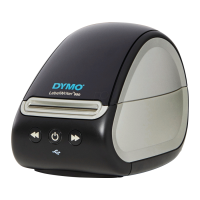
Do you have a question about the newell Dymo LabelWriter 550 and is the answer not in the manual?
Register your DYMO LabelWriter printer online to receive software updates and special offers.
Overview of the DYMO LabelWriter printer's direct thermal printing technology.
Minimum operating system requirements for DYMO Connect for Desktop software.
Steps to download and install the DYMO Connect for Desktop software on your computer.
Procedure for connecting the printer's power adapter and cord to operate the device.
Detailed instructions for loading a roll of authentic DYMO LW labels into the printer.
How to connect the printer to a computer using a USB cable.
Instructions for connecting the printer to a network using a LAN cable.
Step-by-step guide for cleaning the printer's exterior and interior components.
General safety guidelines for handling, operating, and maintaining the printer.
Specific safety instructions related to the printer's power cord and adapter.
Safety warnings regarding printer operation, placement, and handling.
Understanding the meaning of different power status light states.
Solutions for frequently encountered problems with the label printer.
How to contact DYMO Customer Support for further assistance.
Detailed technical data for DYMO LabelWriter 550, 550 Turbo, and 5XL models.
 General
| Connectivity | USB |
|---|---|
| Resolution | 300 dpi |
| Max Print Width | 56 mm |
| Maximum Label Width | 57 mm |
| Compatible Operating Systems | Windows, Mac |
| Label Width | Up to 57 mm |

 To Next Page
