The NEWYES SyncPen Smartpen is a digital writing tool designed to capture handwritten notes and drawings, converting them into digital format. It offers a seamless integration between physical writing and digital storage, allowing users to manage, edit, and share their notes through a dedicated mobile application. The smartpen can be used with special NEWYES paper notebooks or an optional LCD pad, providing flexibility in how users capture their content.
Function Description:
The SyncPen Smartpen's primary function is to digitize handwritten input. When writing on NEWYES paper, the pen's high-speed infrared camera captures the strokes, which are then transmitted to the NEWYES NOTE app via Bluetooth. This allows for real-time synchronization of notes, but the pen also supports an offline mode, storing up to 800 pages of notes internally when not connected to a device. Once reconnected, the offline notes can be synchronized.
The NEWYES NOTE app, available for iOS and Android, serves as the central hub for managing digitized content. Within the app, users can:
- Create and Edit Notebooks: Organize notes into different notebooks, rename them, delete them, and save entire notebooks as PDF files. A "Lock the notes" feature protects content from accidental edits.
- Manage Pages: View pages as images or lists, sort them, and manage multiple pages by adding tags or deleting them. Pages can also be shared on social media or exported as PDF/JPG files.
- Record Audio: The pen allows for audio recording linked to specific notes. Tapping the record icon in the app starts voice recording, which is saved with the current note. Multiple recordings can be associated with a single note.
- Pen/Marker/Eraser Functions: Users can change pen colors and thickness, use the SyncPen as a marker, or utilize an eraser function within the app. These settings can be adjusted by tapping corresponding icons.
- Change Page Background: Customize the background of digital pages with options like dot, line, or blank.
- Insert Images: Add images from an album or take new photos, with basic editing capabilities like zooming, changing position, and rotating.
- Handwriting Recognition (OCR): The app can transcribe handwritten notes into digital text, supporting multiple languages. This feature is crucial for searching notes by keywords.
- Playback Writing Process: Users can view their writing process as a video, with adjustable playback speeds.
- Battery Level Monitoring: The app displays the smartpen's current battery level, indicating when recharging is needed.
For users with an LCD Pad, the SyncPen can also be used to write on the screen, with the content synchronizing to the app. The LCD Pad offers additional features like a delete button to erase content and a lock button to prevent accidental deletion.
Important Technical Specifications:
- Connectivity: Bluetooth 5.0
- Battery: Rechargeable lithium (non-removable)
- Camera: High-speed infrared camera
- Processor: ASIC
- Pressure Level: 1024
- Adaptor: DC5.0V / 500mA
- Charging: Type C USB cable
- Charging Time: 1.5 hours
- Full Charged Time: Continuously writing 8 hours
- Audio: Recording and playback of audio is handled by your companion device (mobile phone).
- Writing Angle: 360° full angles capturing
- Size & Weight:
- Length: 168.0 mm (6.61 in.)
- Width: 10 mm (0.39 in.)
- Weight: 20 grams (0.35 oz.)
- Ink Cartridge: 67mm length x 2.35 mm diameter (compatible NEWYES branded replacement cartridges recommended)
- Minimum App Requirements: iOS 9.0, Android 5.0
- Offline Storage: Up to 800 pages
Usage Features:
- Turning On/Off: The SyncPen automatically turns on by opening the pen cap or by writing directly. It turns off by closing the cap or after 30 minutes of inactivity.
- Pairing: Initial pairing with a device requires Bluetooth to be on and selecting the correct SyncPen via its MAC number in the app.
- Reconnection: Once paired, the SyncPen and device typically reconnect automatically. If not, users can restart the pen, ensure proximity, or tap on paper to activate it.
- Multi-Device/Multi-Pen Management: The SyncPen can be paired with multiple devices, but only one active connection is allowed at a time. Users can also manage multiple SyncPens by assigning unique names within the app.
- Offline Mode: Notes are captured and stored internally even when not connected to a device, ensuring no data loss. Synchronization occurs upon reconnection.
- LCD Pad Integration (Optional): For packages including an LCD Pad, the SyncPen can be used to write on its screen, with content synchronizing to the app. The LCD Pad uses a coin battery and features delete and lock buttons.
- User Account: Registration is required for the app, and each user has a unique ID.
- Search Functionality: Notes can be searched by tags or keywords (after handwriting recognition).
- Customizable Settings: Users can adjust default pen writing thickness, colors, and paper background within the app's settings.
Maintenance Features:
- Battery Recharging: The smartpen's battery level is displayed in the app, prompting users to recharge when it drops below 20%. Charging is done via a Type C USB cable.
- Ink Cartridge Replacement: The SyncPen uses standard ink cartridges (67mm x 2.35mm diameter). NEWYES branded replacement cartridges are recommended, but other compatible carbon-free ink cartridges with leak protection can also be used.
- Software Updates: The app includes a "What's fresh" section to inform users about updates and a "Renew checking" feature for version updates.
- Troubleshooting/Support: If the app encounters issues with a specific phone model, users are advised to contact NEWYES customer support. The "Feedback" section in the app allows users to submit questions, though email is suggested for faster resolution.
- Data Management: Users can delete their account and associated data from the cloud. The "Lock the notes" feature helps prevent accidental edits to important notes.
- Warranty: The product comes with a one-year warranty from the date of delivery, covering main components against manufacturing defects. Artificial damage voids the warranty. For repairs, users should contact the seller or NEWYES customer service.

 Need help?
 General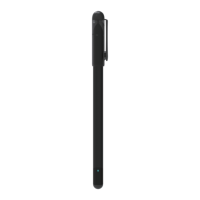

 To Next Page