24 25
6
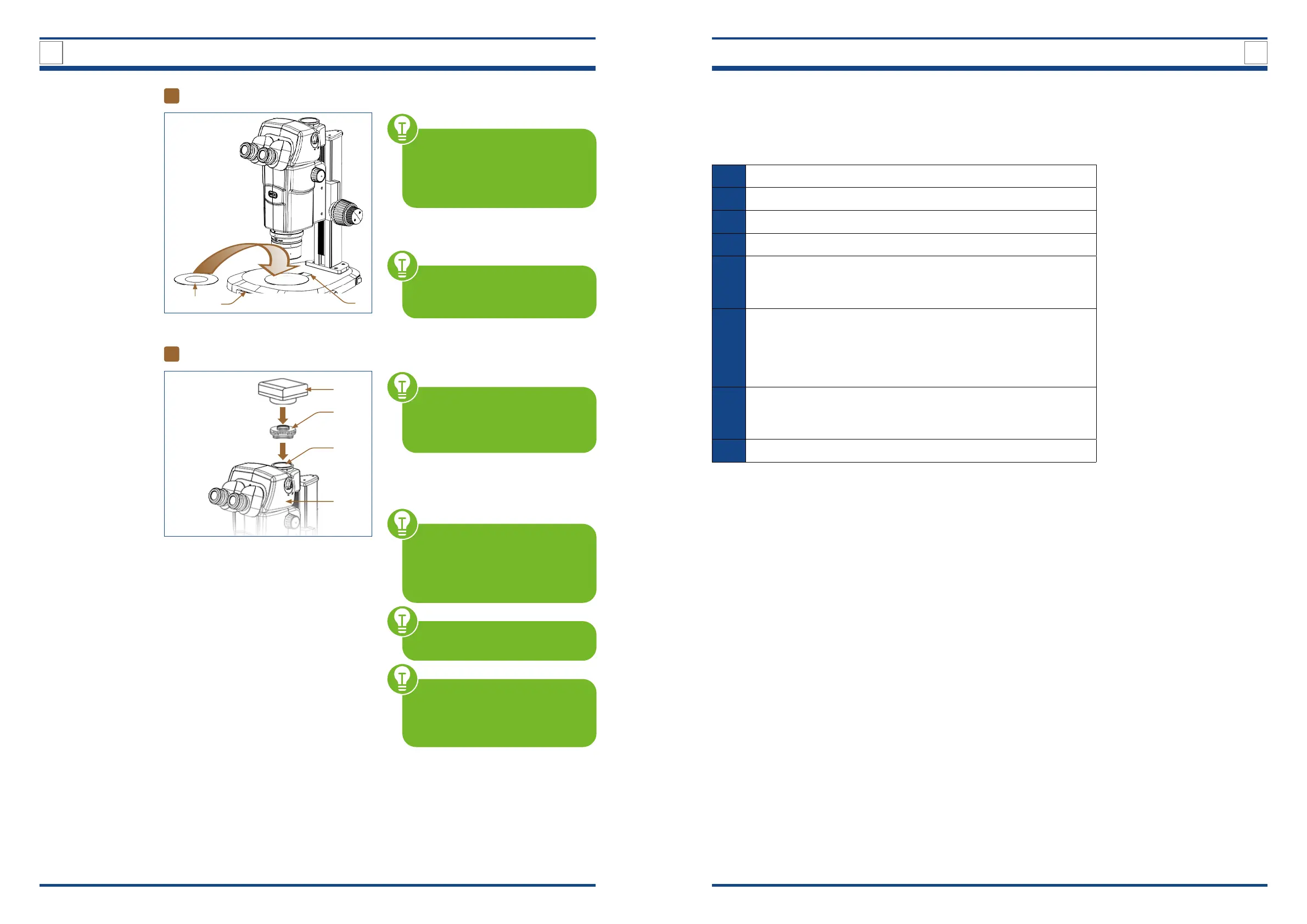
Placing the glass plate
III
Illustration A: Placing the glass plate.
BE CAREFUL WITH THE GLASS
PLATE. First assemble all other
components before placing the
glass plate on the stand base to
avoid glass breakage.
Use the recess (I) in the rear part of the
stand base (II) to place the glass plate
(III) securely.
NOTE: The glass plate only rests
loosely on the stand base. It is not
additionally fastened.
3
DESIGN OF TRINO ZOOM STEREO MICROSCOPE
4
QUICK GUIDE
7
OPTIONAL – Capturing images
IV
III
I
II
Attaching a camera.
A 1x C-mount photo adapter (I)
is already attached to the micro-
scope imaging interface (II) of the
trinocular viewing head (III).
You can put a suitable C-mount camera
(IV) on the photo adapter to take photo-
micrographs or performing videomicro-
graphy.
When installing the camera,
please always make sure that you
HOLD IT FIRMLY IN PLACE to pro-
tect it from damage due to drop-
ping.
NOTE: A camera is not included
in the scope of delivery.
REMEMBER: Cameras usually
show a smaller image section than
eyepieces. This is partly due to the
sensor size and cannot be changed.
4. ADJUSTING THE MICROSCOPE
This chapter describes the individual microscopy steps.
4.1. Quick Guide
1 Setting up power supply and start-up
2 Placing the specimen on the glass plate
3 Switching on the lighting and brightness control
4 Direct light to the eyepieces or to the camera
5
Settings on the trinocular viewing head
a) Adjusting the interpupillary distance
b) Diopter adjustment
6
Settings on the zoom unit
a) Adjust the focus using the focusing knobs
b) Set desired magnication on the zooming knob with scale
c) Contrast adjustment by means of aperture diaphragm (conden-
ser diaphragm)
7
Further adjustment options on the stand base
a) OIC (oblique coherent contrast) illumination
b) Rod without function (in development)
8 AFTER OBSERVATION: Switch off the microscope
II
I



 To Next Page