Takeoff References & Cockpit Configuration
Now, here we will set the takeoff V-speeds and minimums altitude for arrival, and we will set
up the aircraft for takeoff and climb. Go to the left Display Control Panel located on top of
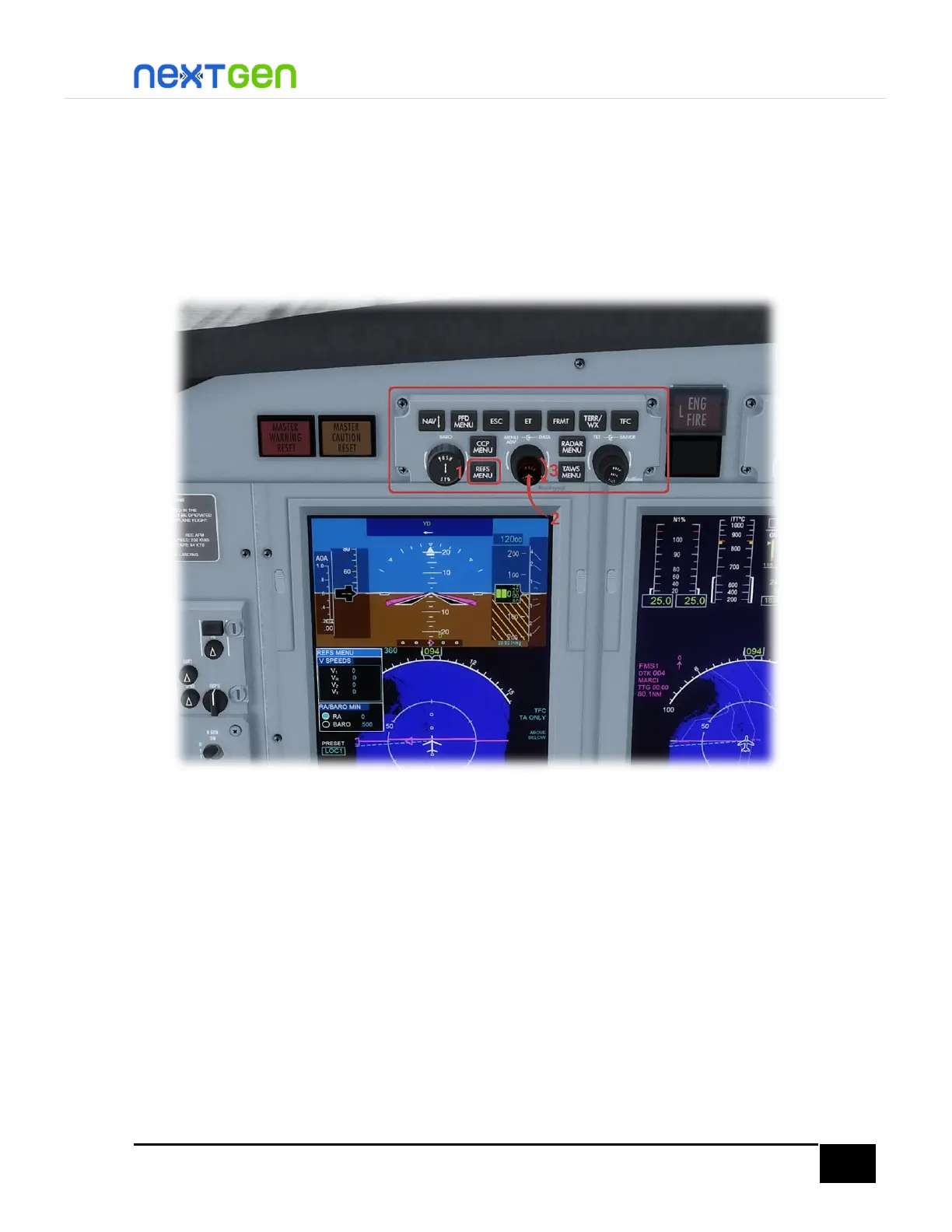
the pilot PFD and (1) press the REFS MENU button. You will see a contextual menu on the left
side of the PFD.
Now, (2) press in the middle of the DATA knob (highlighted in the pic above). To do so, on
3D view, click the middle button (wheel) of your mouse, and if you are on the 2D popup or in
2D view, left-click in the middle of that knob. This will activate edition of the V-speeds, while
a cyan selection box is highlighted on that section. You will see the first digit (V1) in inverted
video. There, use the mouse wheel on the DATA knob to increase the values (3).
To switch between modification of the other fields (for example, change from V1 edition to
VR edition or vice versa), move the MENU ADV knob (4) highlighted in yellow like shown on
the following figure. After moving to the desired V-speed to modify, use the DATA knob to
change its value. Once you are done, press in the middle of the DATA knob to exit and save
changes.


 To Next Page