Enroute Entry
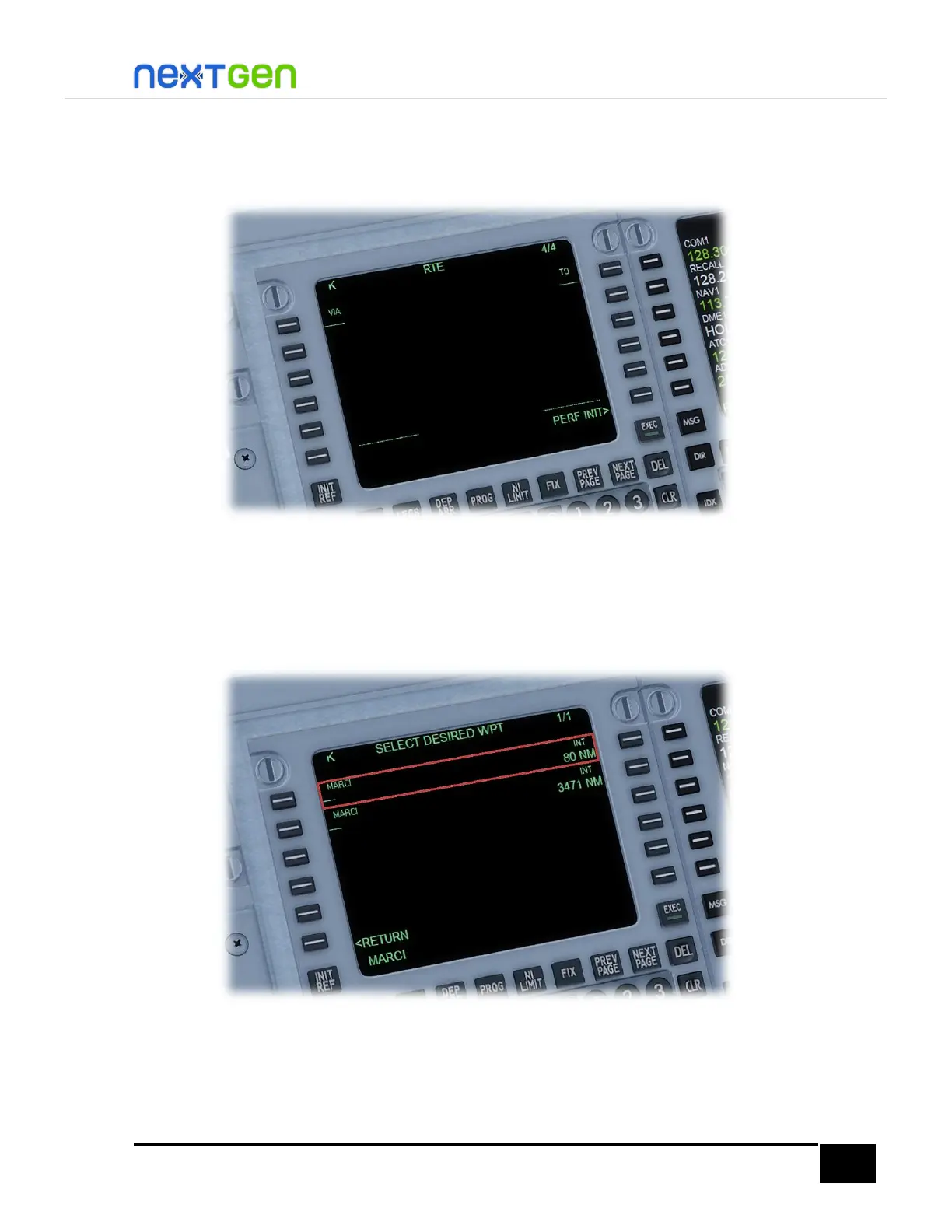
To enter the waypoints of the flight plan, you must be located on the RTE page, then press
NEXT PAGE button, you will see something like the following figure:
Here you type the waypoint name on the scratchpad and line select it in the LSK where the
dashes are. For example, for the first waypoint, type MARCI on the scratchpad and line select,
in this case, the LSK 1R. In this example, MARCI has two different fixes with the same name,
just like the following figure shows. In this case, select the fix located near your position. Push
the LSK L or R, the changes are applied.
TIP: When you want to add waypoints, and the fix you typed on the FMC has more than one
choice, always select the one with the lowest distance MEASURED from your current position,
so you prevent an accidental insertion of a fix located further away from where you are. The
same applies for VOR and NDB stations, except that you can use the station frequency as a


 To Next Page