Aircraft Setup
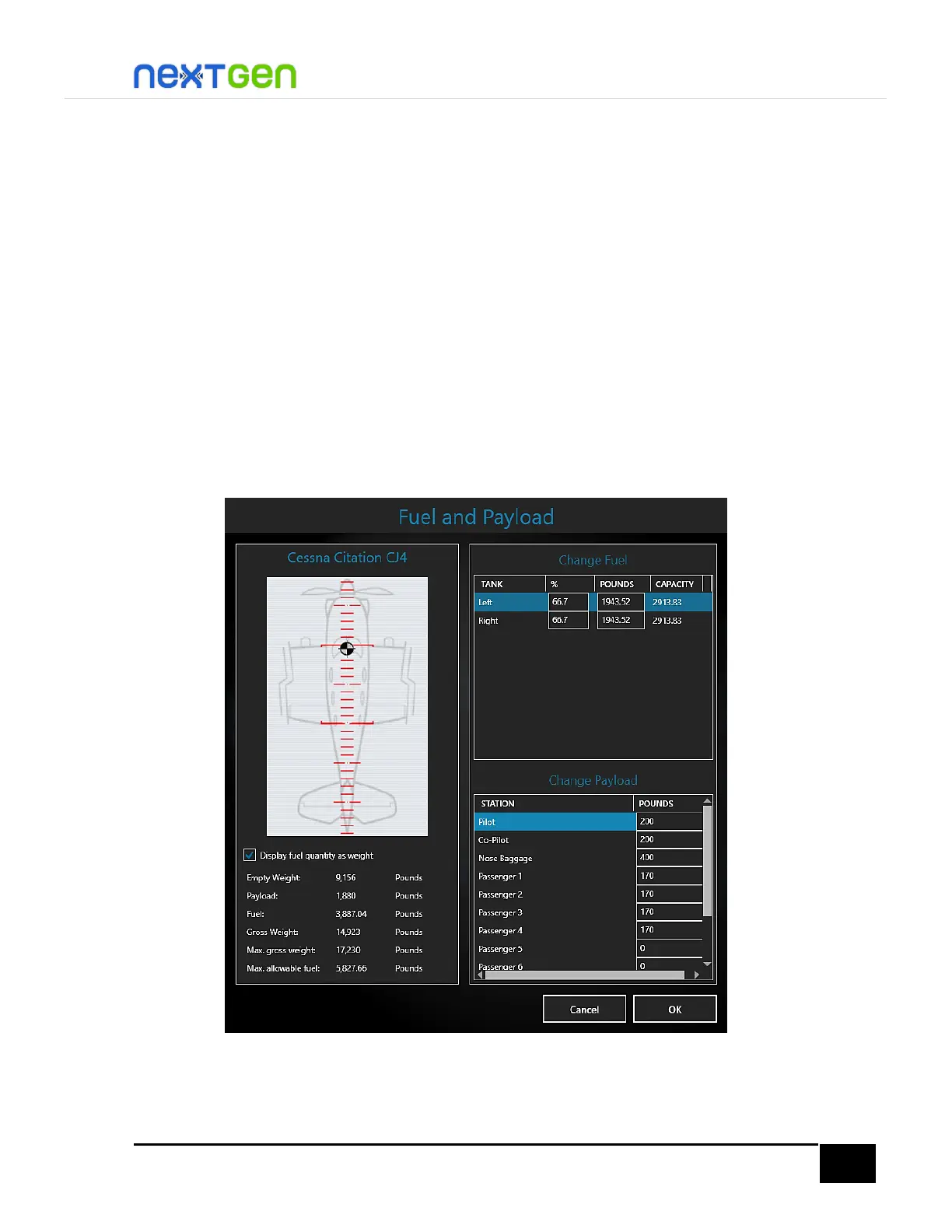
The first thing to do is configure the aircraft’s fuel and payload for the flight. Here you need to open
the Fuel & Payload dialog from your simulator.
By default, the aircraft loads with the maximum ramp weight (17,230 lb.). For this flight, we will
decrease the aircraft weight to less than the maximum takeoff weight (17,110 lb.) so that we can lift
off with the available runway length at KEYW. Let’s assume we want to carry 4 passengers and copilot
and carry 800 lbs. of baggage (400 lbs. on each compartment), so we have 5 passengers on board
(not including pilot, as an average weight for the pilot has been taken into account for the weight &
balance section of the aircraft). Also, we do not want the fuel tanks to be fully loaded as this is a short-
distance flight, so here we will load the fuel tanks to 66% of the total capacity.
To modify the passengers and baggage distribution and fuel capacity, modify everything like in the
following figure. You can also re-distribute the stations so that you keep the CG (represented by a
chess-type colored circle) in the middle.
NOTE: Although it is not visible in the figure above, the Rear Baggage station should read 400 Pounds.
When you are ready, click OK.


 To Next Page