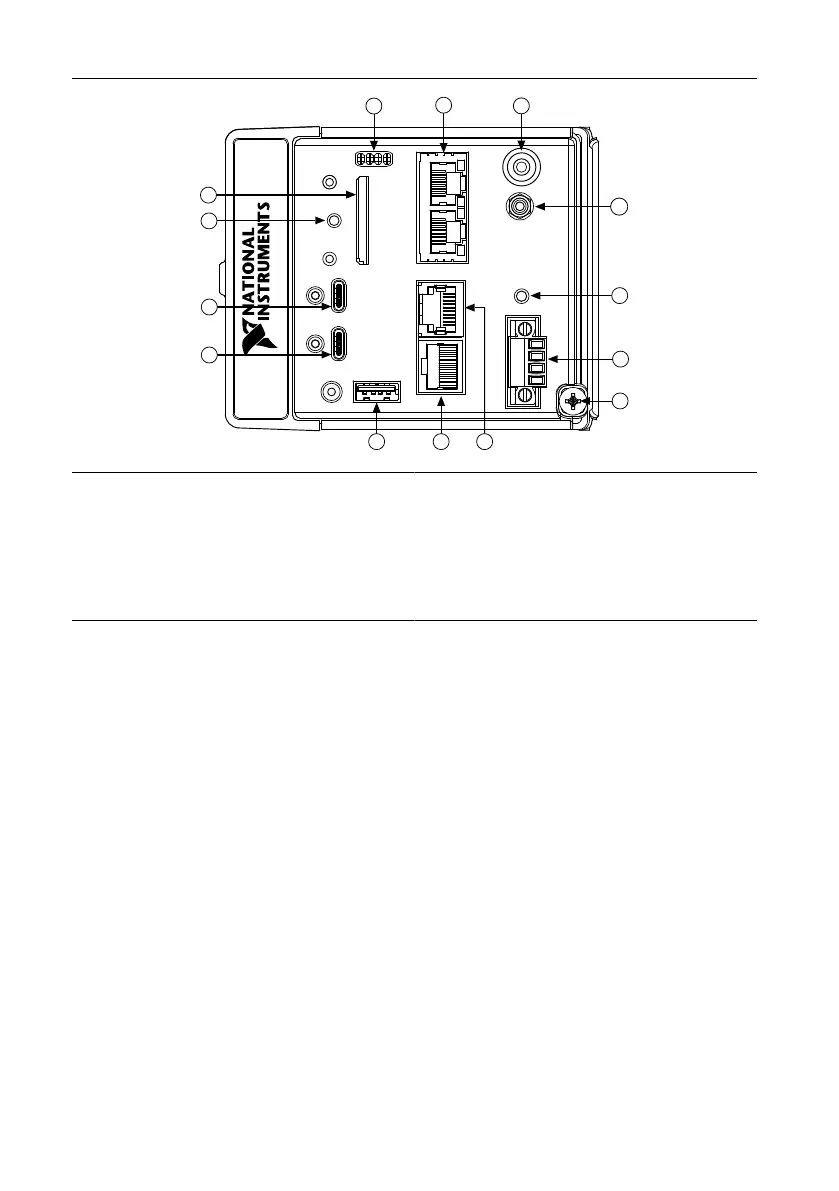
Figure 2. cRIO-904x Front Panel
1. LEDs
2. RJ-45 Gigabit Ethernet Ports
3. USER1 Button
4. PFI 0
5. RESET Button
6. Power Connector
7. Grounding Screw
8. RS-232 Serial Port
9. RS-485 Serial Port
10. USB 2.0 Type-A
11. USB 3.1 Type-C with DisplayPort Alt Mode
12. USB 3.1 Type-C Dual Role
13. SD In Use LED
14. SD Card Removable Storage
Connecting the Controller to Ground
You must connect the cRIO-904x grounding terminal to the grounding electrode system of the
facility.
What to Use
• Ring lug
• Wire, 1.3 mm
2
(16 AWG) or larger
• Screwdriver, Phillips #2
What to Do
Complete the following steps to ground the cRIO-904x.
1. Attach the ring lug to the wire.
2. Remove the grounding screw from the grounding terminal on the cRIO-904x.
cRIO-904x Getting Started Guide | © National Instruments | 5



 To Next Page