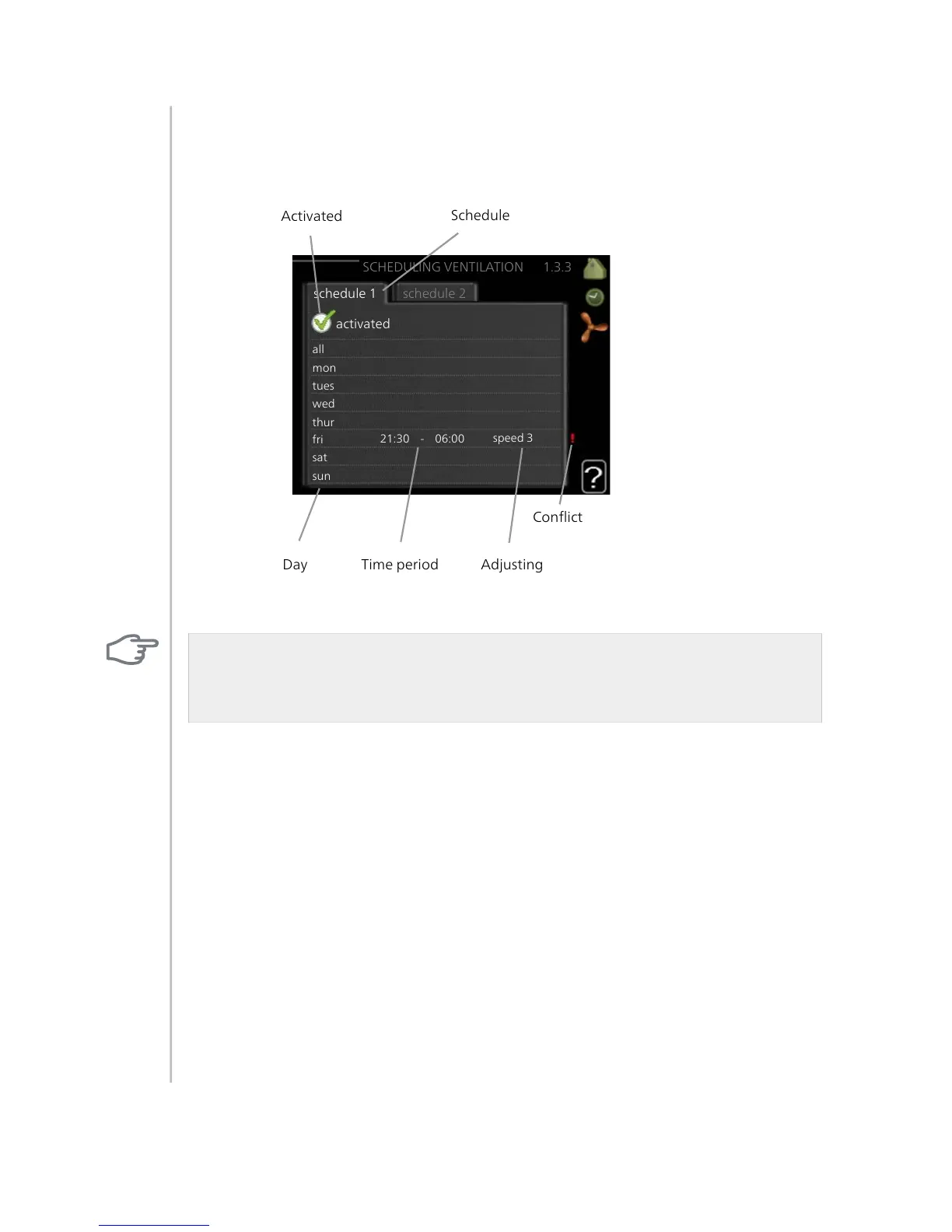
Menu 1.3.3 ventilation (accessory required)
Increases or decreases in the ventilation to the accommodation can be
scheduled here for up to two time periods per day.
Adjusting: The desired fan speed is set here.
Caution
A significant change over a longer period of time may cause poor indoor
environment and worse operating economy.
Schedule: Which of the above schedules to be changed is selected here.
Activated: Scheduling for the selected period is activated here. Set times
are not affected at deactivation.
System: Which climate system the schedule is for is selected here. This
alternative is only displayed if more than one climate system is present.
Day: Select which day or days of the week the schedule is to apply to here.
To remove the scheduling for a particular day, the time for that day must
be reset by setting the start time to the same as the stop time. If the line
"all" is used, all days in the period are set for these times.
Time period: The start and stop time for the selected day for scheduling
are selected here.
Adjusting: See relevant sub menu above.
Conflict: If two settings conflict with each other a red exclamation mark
is displayed.
NIBE™ F1155Chapter 3 | F1155 – at your service32



 To Next Page