9 – English
English
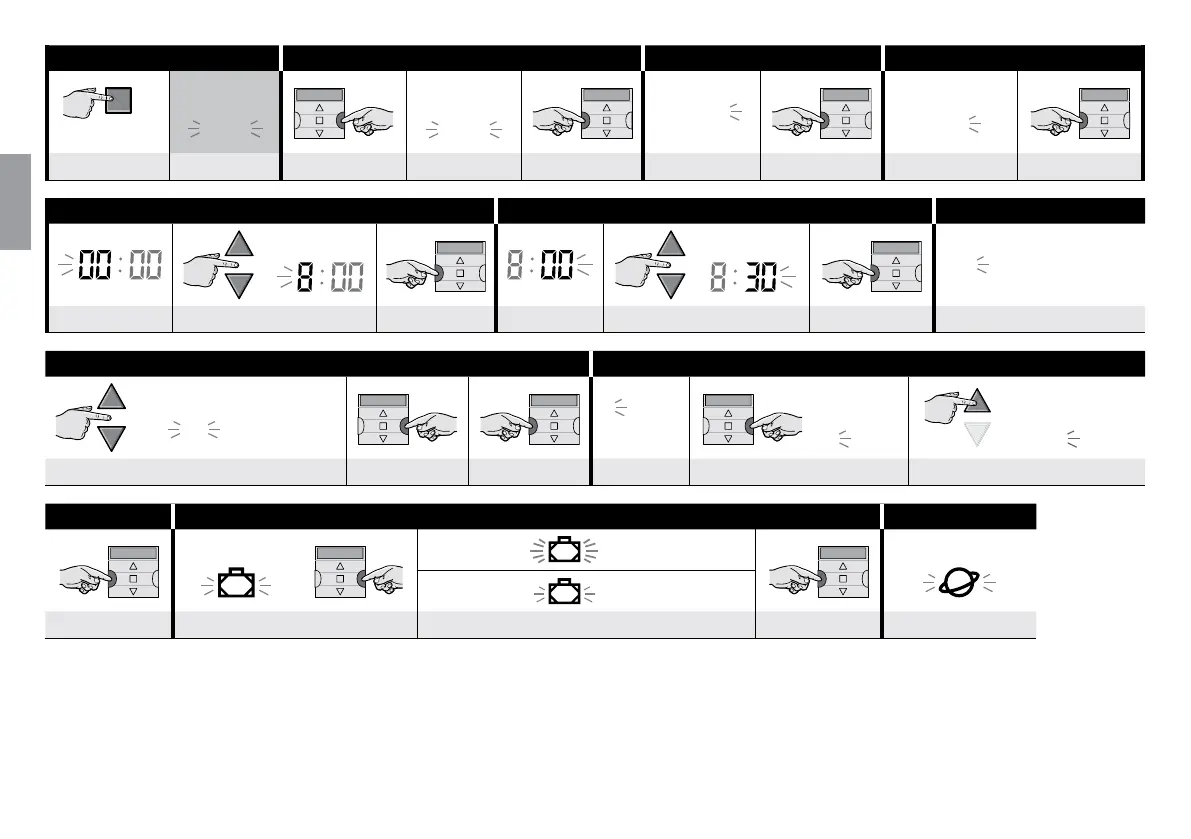
Step 1 Step 2 Step 3 Step 4
main
screen
Auto
Auto
Man
Prog
Prog
Prog
NEWU
several times ... (display) 2 times (display) conrm Prog. EVENTS conrm NEW EVENT conrm
Step 5 Step 6 Step 7 ...
example:
example:
Su Mo Tu We Th Fr Sa
HOUR set the HOUR conrm MINUTES set the MINUTES conrm DAY (name)
... Step 7 Step 8 ...
example: Monday
Su Mo Tu We Th Fr Sa
1 2 3
4 5 6
example:
1
2
3
4
5
6
example:
1
2
3
4
5
6
select the DAY (name)
(1)
select conrm GROUP set the GROUP
(2)
set the MANOEUVRE
... Step 8 Step 9 Step 10 ...
slow ashing
• fast ashing = function selected
(3)
slow ashing
• slow ashing = function deselected
conrm ON VACATION several times ... ......... to select / deselect the function conrm PLANETARY TIME
(continue ––
>
)



 To Next Page