R
BIN
Input
Shift
Output
R
L
Quick Reference Guide
RT-6100
Displays the side menu.
<Side menu>
<Distance/Near>
<Day/Night>
Selects the mode for data entry and measurement.
<Measurement mode>
Displays the currently presented chart.
<Chart display>
Selects the right eye, binocular eyes, or left eye.
<Patient’s eye selection>
Changes the mode to SPH, CYL,
AXIS, or VA.
<Dial button>
Changes the selected value.
<Dial>
, Covers or uncovers the
measuring window (right/left).
<Window Open/Close>
<VA chart masking>
, Places the cross cylinder lens and enters
AXIS or CYL mode.
This button is used to flip the cross cylinder lens
in AXIS or CYL mode.
<Cross cylinder switching>
Exports or prints data.
+ Clears data.
<Output>
Displays the program select window.
<Program selection>
Select the chart to be presented.
<Chart selection>
・Displays the previously set data.
・Displays the data set before the previous setting.
<Sub windows 1&2 (right/left) >
Toggles between the day vision test and
night vision test .
<Auxiliary lens selection>
Displays the data of the lens currently in place.
<Current data area>
Displays the explanation for the presented chart.
<Help button>
<Favorites registration>
Displays icons for charts added as favorites.
Displays the refraction procedure.
<Program message area>
Displays the auxiliary lens select window (right/left).
R
L
R
L
<
Auxiliary function selection
>
, Changes the selected value.
<Numeric entry>
Displays the import data select screen for
AR or LM data.
<Data entry>
・ Starts a refraction program.
・ Advances to the next test while
a program is running.
・ + Returns to the previous test.
<Program advance>
Pressing a button or turning the
dial while holding changes
functions or increments.
<Shift function>
Changes the contrast.
Displays charts in inverted black and white.
Presents charts in night use brightness.
Turns the glare lamp on or off.
Changes the horizontal line letters randomly.
= +
Availability depends on charts.
Toggles between the distance vision test and
near vision test .
FAR
NEAR
Isolates a vertical column. Pressing the button
, again isolates its left or right column.
, Isolates a horizontal row.
Pressing the button again isolates its upper or
lower row.
Isolates a horizontal row.
Isolates a single letter.

 Need help?
 General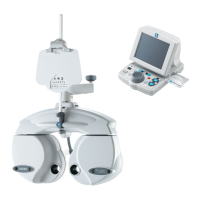






 To Next Page