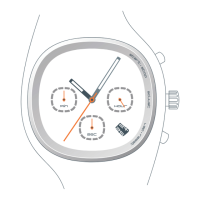
M
O
D
E
S
T
A
R
T
/
S
T
O
P
A
D
J
U
S
T
S
P
L
I
T
/
R
E
S
E
T
DAY/MONTH DATE
MODE
SPLIT/RESET
START/STOP
ADJUST
ELECTROLITE
TIME
3 Press SPLIT/RESET button to advance to next programmable
element.
The minutes begin blinking.
4 Press START/STOP button to advance the blinking element.
Press once to advance one minute. Hold down for quick
advance.
5 Repeat steps 3 and 4 until you have properly set all
elements: seconds, minutes, hours, day, month, year, 24
or 12-hour clock, and day/date or month/date display.
6 Press the ADJUST button to save changes.
Time is set and no elements are blinking.
M
O
D
E
S
T
A
R
T
/
S
T
O
P
A
D
J
U
S
T
S
P
L
I
T
/
R
E
S
E
T
M
O
D
E
S
T
A
R
T
/
S
T
O
P
A
D
J
U
S
T
S
P
L
I
T
/
R
E
S
E
T
M
O
D
E
S
T
A
R
T
/
S
T
O
P
A
D
J
U
S
T
S
P
L
I
T
/
R
E
S
E
T
7
Set time and calendar information
1 In TIME mode, press and hold the ADJUST button for
two seconds.
The second designator blinks. Note that the adjustable
element is always blinking. If no buttons are pressed for
2-3 minutes, the watch will exit ADJUST and return to
TIME mode.
2 Press START/STOP button.
Under thirty seconds the value resets to zero. If over
thirty seconds, minutes advance.
M
O
D
E
S
T
A
R
T
/
S
T
O
P
A
D
J
U
S
T
S
P
L
I
T
/
R
E
S
E
T
M
O
D
E
S
T
A
R
T
/
S
T
O
P
A
D
J
U
S
T
S
P
L
I
T
/
R
E
S
E
T
a
TIME
6
In TIME mode, you can set and
view the time and calendar
information for two time zones.
You can also set a confirmation
tone which sounds at the
press of any button. To easily
distinguish the TIME mode,
this tone is different than
the tone for other modes.
Tempest Manual 4.0 6/8/99 11:18 AM Page 6



 To Next Page