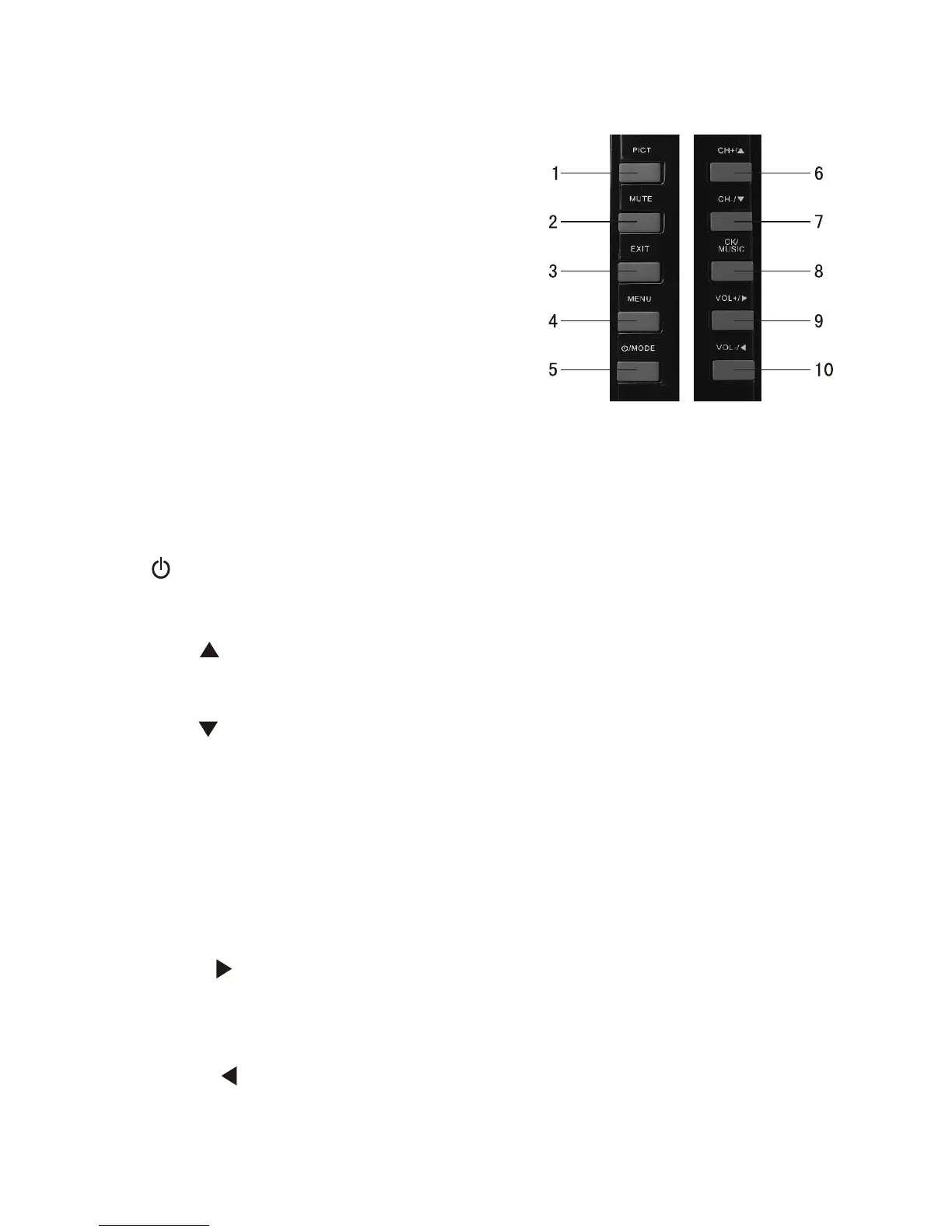
1. PICT: Long press for 3 seconds as
Picture mode under TV/AV mode,
under picture switch mode as
"STANDARD", "SOFT", "VIVID",
"LIGHT", "PERSONAL", Press for
Picture adjust/panel display mode/
reset selection key under DTV mode,
able to choose brightness, contrast,
chroma, hue (only available with NTSC
system), panel disply mode and reset.
Note: keep pressing for 3 seconds have
no functions under OSD menu in DTV mode.
2. MUTE: Press to switch between MUTE and sound under all mode.
3. EXIT: Return key: press to exit current menu and return to previous
menu.
4. MENU: menu key.
5
CH+/ Under DTV mode, press as direction key with DTV menu,
press as CH+ key without DTV menu; press as CH+ key under ATV
mode; press to select upward under CARD mode.
7. CH-/ : Under DTV mode, press as direction key with DTV menu,
press as CH- key without DTV menu; press as CH- key under ATV
mode; press to select downward under CARD mode.
8. OK/MUSIC: Under DTV mode: press as confirm key under Menu
surface, press to display program list without menu surface; Under
CARD mode: press as confirm key under Menu surface. After enter
Picture viewing mode, press for picutre display mode, long press for
background music function; Under ATV mode: keep press for 3
seconds for auto-search
9. VOL+/ : Under DTV mode, press as direction key with DTV menu,
press as VOL+ key without DTV menu; press as VOL+ key under ATV
mode; Under CARD mode, when playing music and video, press as
VOL+, press as rightward key when exit playing.
10. VOL-/ : Under DTV mode, press as direction key with DTV menu,
press as VOL- key without DTV menu; Press as VOL- key under ATV
mode; Under CARD mode, when playing music and video, press as
VOL-, press as leftward key when exit playing.
. /MODE(Standby/Operation mode shift button): Press to switch
modes between DTV/ATV/AV, press and hold over 3 seconds for
turning off TV.
6. :
-4-
IV Instruction of control panel buttons


 To Next Page