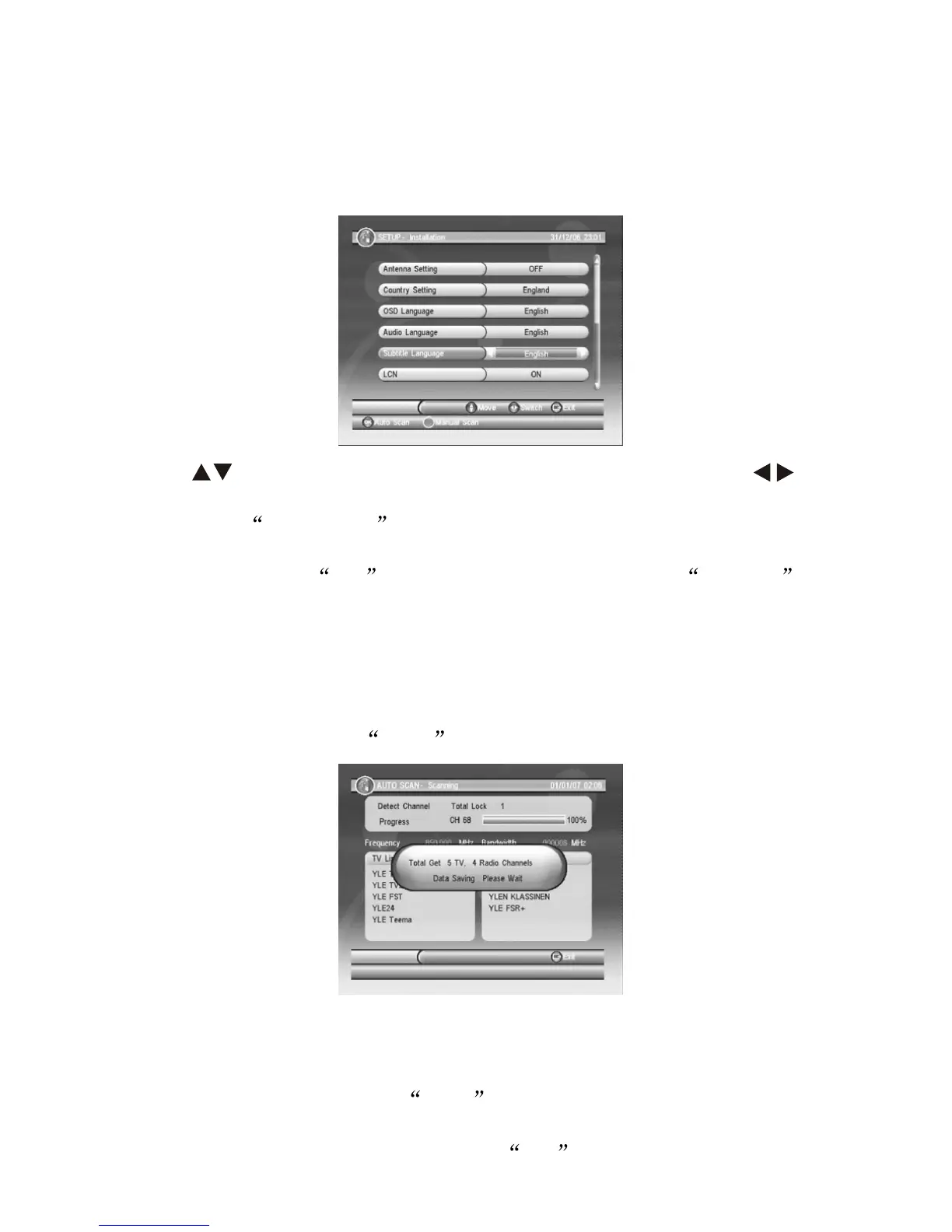
When first time usages or program list do not exist, the DVB-T
Installation Guide will display once the device is turned ON. Please
set up as the following Pictures.
VII DVB-T Installation Guide
Press key to move the cursor to your wanted item, press to
adjust with your local DVB-T standard setting.
Note: If the COUNTRY setting is incorrect, less or even no
channel can be received.
After setting, press OK key for auto scan or press the GREEN
key on the remote control for manul scan.
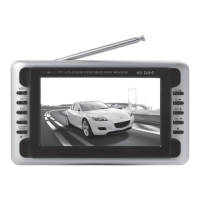
7.1 Auto-Scan will empty the program list, then following your
selected COUNTRY to scan the local DVB-T signal frequency and
bandwidth. It might take quite a while for the Auto-Scan, program
will be autosave. Press EXIT to stop Auto-Scan.
-7-
7.2 Manual-Scan enables to add Scaned program into the program
list, while the exist program list will not be dele. The same frequency
and bandwidth channel will be coverd. Choose the Channel number
for Manual-Scan (press the RED key on the remote control to
nput directly digit numbers to edit channel number) or insect correct
frequency and bandwidth, then press OK to start Manual-Scan.


 To Next Page