8
Take Pictures
Take pictures
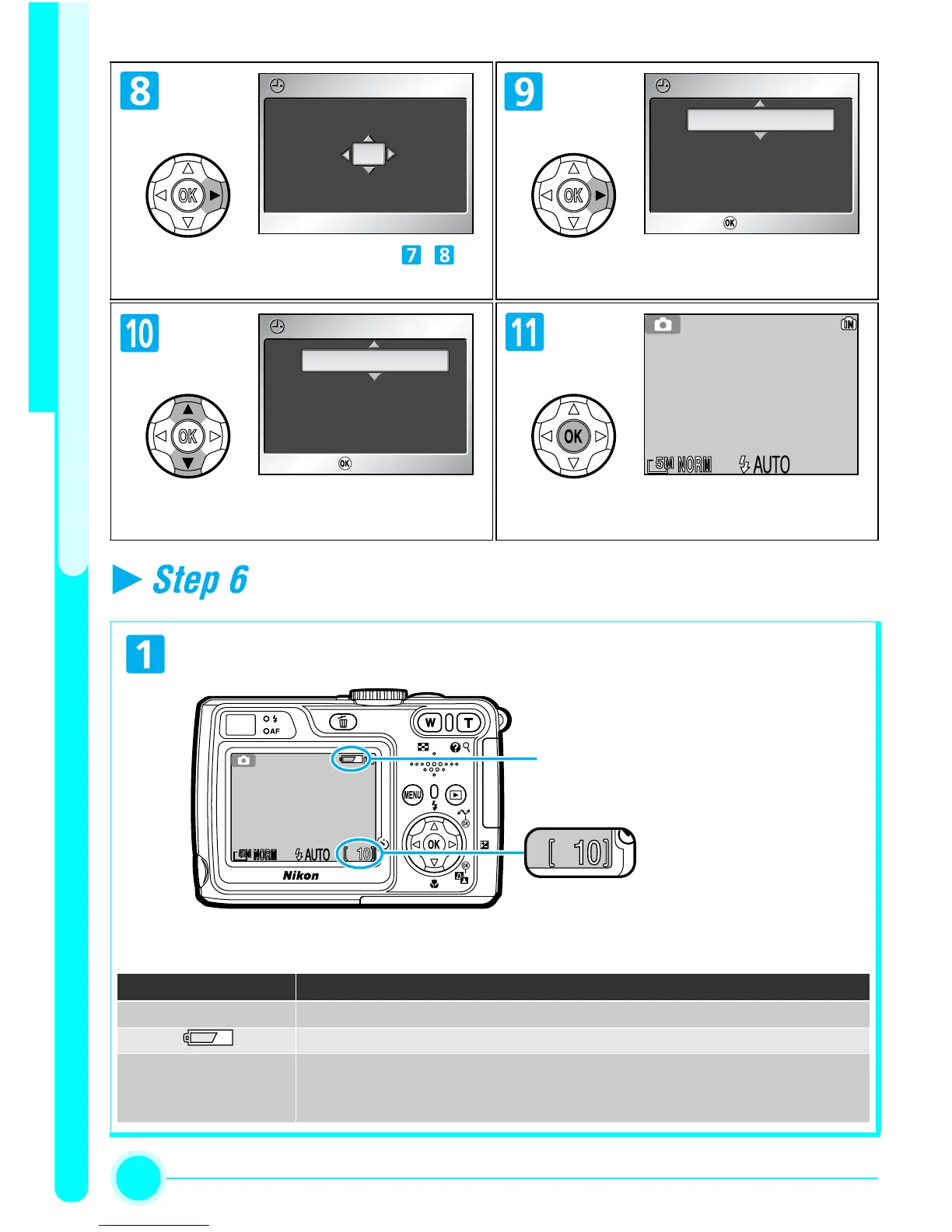
Select Month. Repeat steps - to
edit Month, Year, hour, and minutes.
Highlight D M Y.
Choose order in which Day, Month,
and Year will be displayed.
Exit to shooting mode.
Check the indicators in the monitor.
The battery level is shown in the monitor as follows:
DATE
01 03 2005
00 : 00
DATE
DM Y
DATE
01 03 . 2005
10 : 00
DATE
DM Y
ConfirmConfirm
DATE
03 01 . 2005
10 : 00
DATE
MD Y
ConfirmConfirm
[ 10][ 10]
Battery level indicator
Shown when the battery is low.
Number of
exposures
remaining
Display Description
NO ICON Battery fully charged.
Low battery. If flash fires, monitor turns off while Speedlight recharges.
WARNING!!
BATTERY
EXHAUSTED
Replace with new or fully charged battery.


 To Next Page