ii
Introduction
Introduction
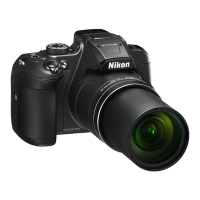
Thank you for purchasing the Nikon COOLPIX B700 digital camera.
Downloading the “Reference Manual”
The Reference Manual (PDF format) provides details in various languages on how to use
this product. Download the Reference Manual from our Download Center at the URL
below and save it on your smart device or computer for reference.
• The Reference Manual can be viewed using Adobe Acrobat Reader (downloadable
from the Adobe website) or iBooks (an iOS app).
Downloading Nikon Software
For Computer
Download the software from our Download Center at the URL below.
• ViewNX-i: This software enables you to transfer images and movies to your
computer for viewing and editing.
• Capture NX-D: This software enables you to adjust images transferred to your
computer and process RAW images.
For Smart Device
• SnapBridge: When you establish a wireless connection, this app enables you to
upload images and movies to your smart device. See “Connecting to a Smart
Device (SnapBridge)” (A14) for information on how to download the app and
establish a connection.
Visit Our Download Center
http://downloadcenter.nikonimglib.com
Visit our website to download manuals for Nikon imaging
products, computer software, or firmware.
Read This First
COOLPIX B700 Model Name: N1513


 To Next Page