20
Other Functions
Other Functions
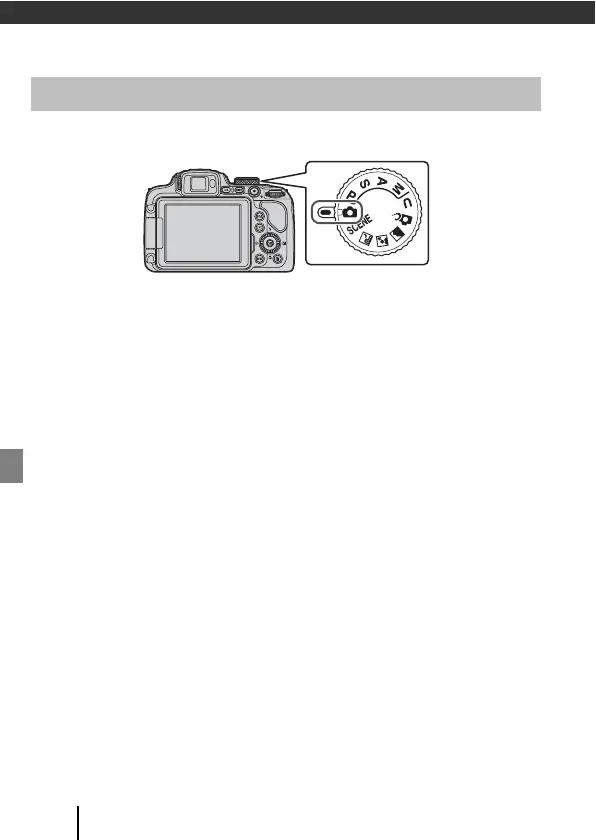
You can rotate the mode dial to align the desired shooting mode with the indicator
mark on the camera body.
• A (Auto) mode
Select this mode to perform general shooting in a variety of shooting conditions.
• y, X, s, and c (Scene) modes
Select any one of scene modes based on the shooting conditions, and you can
take pictures with the appropriate settings for those conditions.
- y: Press the d button and select a scene mode. When using Scene
auto selector, the camera recognizes the shooting conditions when you frame
a picture, and you can take pictures in accordance with the conditions.
- X (night landscape): Use this mode to shoot night landscapes.
- s (night portrait): Use this mode to shoot evening and night portraits that
include background scenery.
- c (landscape): Use this mode to shoot landscapes.
• p (Creative) mode
Apply effects to images during shooting.
• j, k, l, and m modes
Select these modes for greater control over shutter speed and f-number.
• M (User settings) mode
The frequently used settings in j, k, l, and m modes can be saved. To shoot
with the saved settings, rotate the mode dial to M.
Selecting a Shooting Mode


 To Next Page