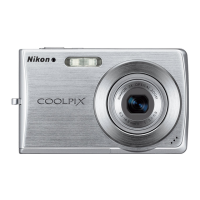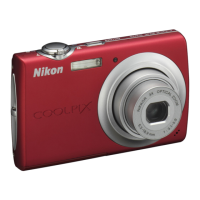
Why is image mode not available on my Nikon COOLPIX S203 Digital Camera?
- BBeth SanchezSep 8, 2025
If the image mode is not available on your Nikon Digital Camera, change the Continuous setting if Multi-shot 16 is selected.

Why is image mode not available on my Nikon COOLPIX S203 Digital Camera?
If the image mode is not available on your Nikon Digital Camera, change the Continuous setting if Multi-shot 16 is selected.
How to fix overexposed pictures on Nikon COOLPIX S203?
If your pictures are too bright when using your Nikon Digital Camera, adjust exposure compensation.
What to do if my Nikon Digital Camera won't take a picture?
If your Nikon Digital Camera isn't taking pictures when you press the shutter-release button, make sure you are not in playback mode and press the A button or the shutter-release button. If menus are displayed, press the d button to exit them. Also, ensure the battery isn't exhausted—charge or replace it if needed. Finally, if the flash lamp is blinking, wait for the flash to finish charging before attempting to take a picture.
How to turn on shutter sound on Nikon Digital Camera?
If there is no sound when the shutter is released on your Nikon Digital Camera, ensure that 'Off' is not selected for Sound settings>Shutter sound in the setup menu; enable it. If Continuous, Multi-shot 16 or BSS is selected for the Continuous setting in the shooting menu, change the Continuous setting. If d (Sports scene mode) or l (Museum scene mode) is selected, change the scene mode. If D mode is selected, change the mode. Also, make sure the speaker is not blocked.
What to do if Nikon Transfer doesn't start when I connect my Nikon COOLPIX S203?
If Nikon Transfer isn't starting when you connect your Nikon Digital Camera, ensure the camera is turned on and that the battery isn't exhausted—charge or replace it if necessary. Also, make sure the USB cable is correctly connected. The camera might not be recognized by the computer, so check computer settings. Ensure the computer is set to start Nikon Transfer automatically. Check the compatible operating systems.
Why can't I use digital zoom on my Nikon COOLPIX S203?
If you cannot use the digital zoom on your Nikon Digital Camera, first ensure that digital zoom is enabled in the setup menu. Note that digital zoom is not available when Scene auto selector, Portrait, or Night portrait is selected for scene mode, so change the scene mode. Also, it is not available when shooting in smile mode, so change the shooting mode. Digital zoom is unavailable just before recording a movie, but up to 2× can be applied while recording movies, so wait until after movie recording. Finally, it is not available when Multi-shot 16 is selected for the Continuous setting, so change the Continuous setting.
How to enable flash on Nikon COOLPIX S203?
If the flash on your Nikon Digital Camera is not firing, first ensure that the flash is turned on. Some scene modes do not allow the flash to be turned on, so change the scene mode. If D mode is selected, change the mode. Also, if Continuous, Multi-shot 16, or BSS is selected for the Continuous setting, change the Continuous setting.
Why did my Nikon Digital Camera settings reset?
If your Nikon Digital Camera settings reset, the backup battery is exhausted, and all settings were restored to their default values. Replace the backup battery.
How to set date and time on Nikon COOLPIX S203 Digital Camera?
If the date and time are incorrect on your Nikon Digital Camera, set the correct time and date from the Date option in the setup menu. Also, check the camera clock regularly against more accurate timepieces and reset as required.
How to fix blurry pictures on Nikon Digital Camera?
If the pictures from your Nikon Digital Camera are blurred, try using the flash. You can also select High ISO sensitivity auto in the shooting menu for ISO sensitivity. Consider using electronic vibration reduction or motion detection. Using BSS may also help. For sharper images, use a tripod and the self-timer.
| Camera Type | Compact digital camera |
|---|---|
| Digital Zoom | 4x |
| Interface | USB |
| Image Sensor | 1/2.3 in. CCD |
| Lens | NIKKOR lens |
| Focus Range | 30 cm - ∞ (Wide), 50 cm - ∞ (Telephoto) |
| Storage Media | SD/SDHC memory cards |
| ISO Sensitivity | 80, 100, 200, 400, 800, 1600 |
| Power Sources | Rechargeable Li-ion Battery |
| Video Resolution | 640 x 480 (30 fps) |
| Monitor | 2.5-in., approx. 230k-dot, TFT LCD monitor |
| Weight | Approx. 115 g (4.1 oz) with battery and SD/SDHC memory card |
Step-by-step guide on how to connect the charger and charge the camera battery.
Instructions on how to correctly insert the rechargeable Li-ion battery into the camera.
Procedure for safely removing the battery from the camera.
Guide to setting the camera's language, date, time, and time zone preferences.
Instructions for inserting Secure Digital (SD) memory cards into the camera.
Steps to turn on the camera and select the automatic shooting mode.
Details on how to achieve focus and take a picture using the shutter-release button.
How to view stored pictures and delete unwanted ones from the camera.
Explanation of available flash modes and how to set them.
How to adjust exposure compensation to make pictures brighter or darker.
Explains how the camera automatically shoots when a smiling face is detected.
Instructions on how to record movies with sound using the camera's built-in microphone.
How to play back recorded movies and control playback functions.
Guide to recording voice memos using the built-in microphone.
Steps for connecting the camera to a computer for transferring pictures.
Detailed procedure for transferring images using Nikon Transfer software.
Instructions for connecting the camera directly to a PictBridge-compatible printer.
Details on the various shooting settings available in the camera's shooting menu.
Explanation of image size and quality settings for optimizing pictures.
Guide to adjusting white balance to match different light sources for natural colors.
How to select focus areas for the camera, including face priority and manual options.
Overview of features available in the playback menu for managing pictures.
Instructions on how to delete selected or all pictures from the camera.
Guide to the camera's setup menu for customizing various settings.
Instructions for setting the camera clock and managing time zones.
Instructions for formatting the internal memory or memory card.
Lists common error messages, their problems, and solutions.
Provides solutions for common problems encountered with the camera's operation.
Detailed technical specifications for the Nikon COOLPIX S203 digital camera.