10
Basic Operations
Introduction
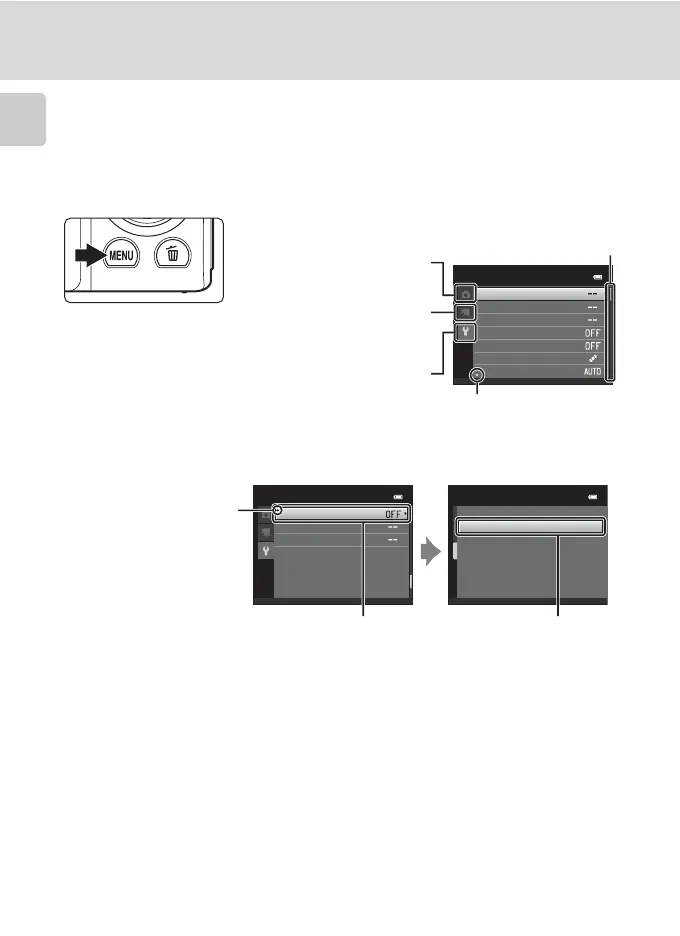
The d Button
Press the d button to display the menu for the selected mode.
• Use the multi selector to navigate the menus (A 9).
• Choose a tab on the left to switch to the menu of the selected tab.
• Press the d button again to exit the menu.
Welcome screen
Time zone and date
Monitor settings
Motion detection
AF assist
Print date
Electronic VR
Set up
Set up
Blink warning
Reset all
Firmware version
Blink warning
On
O
Displayed when the menu
contains two or more pages
Tab for the menus available in
the current shooting/playback
mode
Displayed when there
are one or more menu
items to follow
Displayed when previous
menu items are available
Choose an option and press
the k button or the multi
selector K to proceed to the
next set of options
Press the k button or the
multi selector K to apply
selection
Tab for displaying the movie
menu (during shooting mode)
Tab for displaying the setup
menu



 To Next Page
 Loading...










