13
Inserting the Battery
First Steps
Removing the Battery
Turn the camera off (A 17) and be sure that the
power-on lamp and the monitor have turned off before
opening the battery-chamber/memory card slot cover.
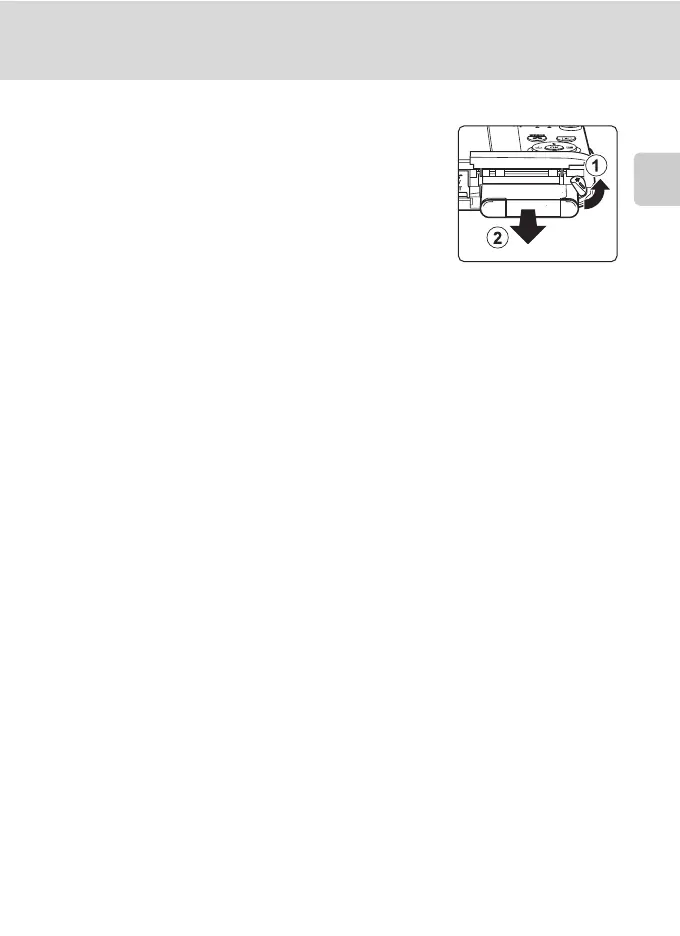
To eject the battery, open the battery-chamber/
memory card slot cover and slide the orange battery
latch in the direction indicated by the arrow (
1
). The
battery can then be removed by hand (
2
).
• Note that the camera, battery, and memory card
may become hot during use; observe due caution when removing the battery.
B Notes on the Battery
• Be sure to read and follow the warnings for the battery on page iii and the section, “The Battery”
(A 157), before using the battery.
• If the battery is not used for an extended period, recharge it at least once every six months and
completely exhaust it before returning it to storage.



 To Next Page
 Loading...










