X
16
Attach a Lens
Care should be taken to prevent dust from entering the camera when the lens is
removed.
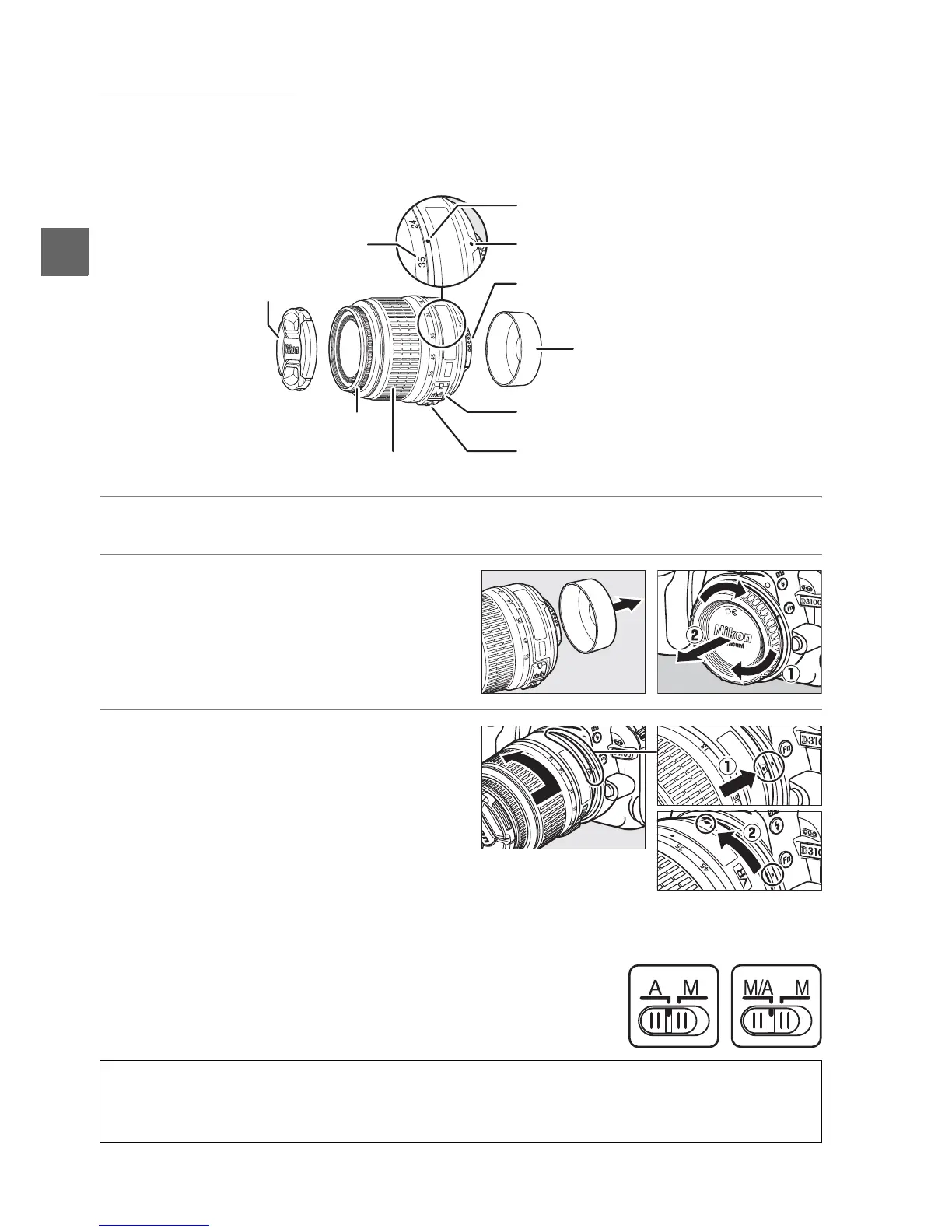
The lens generally used in this manual for illustrative purposes is an AF-S
DX NIKKOR 18–55mm f/3.5–5.6G VR.
1 Turn the camera off.
2 Remove the rear lens cap and the
camera body cap.
3 Attach the lens.
Keeping the mounting mark on the
lens aligned with the mounting mark
on the camera body, position the lens
in the camera’s bayonet mount (q).
Being careful not to press the lens-
release button, rotate the lens
counter-clockwise until it clicks into
place (w).
Slide the A-M switch to A (autofocus; if
the lens has an M/A-M switch, select M/A
for autofocus with manual override).
D Autofocus
Autofocus is supported with only AF-S and AF-I lenses, which are equipped with autofocus
motors.
Autofocus is not available with other AF lenses (0 167).
Focal length scale
Focal length mark
A-M switch (see below)
VR (vibration reduction) switch (0 17)
Mounting mark
Rear lens cap
Lens cap
Focus ring (0 43, 62)
CPU contacts
(0 168)
Zoom ring



 To Next Page