87
t
White Balance
White balance ensures that colors are unaffected by the color of the light source.
Auto white balance is recommended for most light sources; in P, S, A, and M modes,
other values can be selected if necessary according to the type of source:
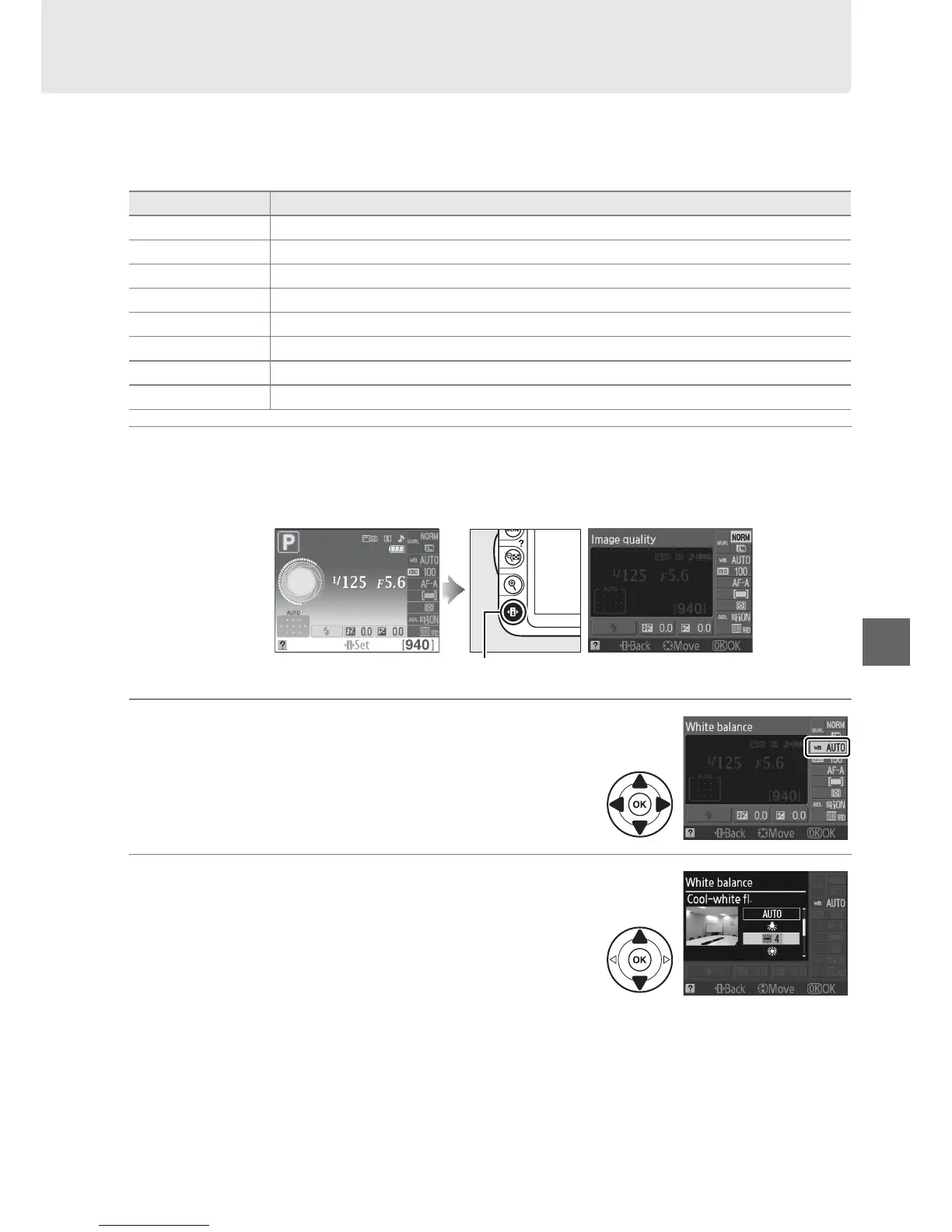
1 Place the cursor in the information display.
If shooting information is not displayed in the monitor, press the P button.
Press the P button again to place the cursor in the information display.
2 Display white balance options.
Highlight the current white balance setting in
the information display and press J.
3 Choose a white balance option.
Highlight an option and press J.
To return to
shooting mode, press the shutter-release button
halfway.
Option Description
v Auto Automatic white balance adjustment. Recommended in most situations.
J Incandescent Use under incandescent lighting.
I Fluorescent Use with the light sources listed on page 88.
H Direct sunlight Use with subjects lit by direct sunlight.
N Flash Use with the flash.
G Cloudy Use in daylight under overcast skies.
M Shade Use in daylight with subjects in the shade.
L Preset manual Measure white balance or copy white balance from existing photo (0 90).
Information display P button



 To Next Page