116
Q
Connecting the Camera
Connect the camera using a UC-E4 USB cable (available separately).
1 Turn the camera off.
2 Turn the computer on.
Turn the computer on and wait for it to start up.
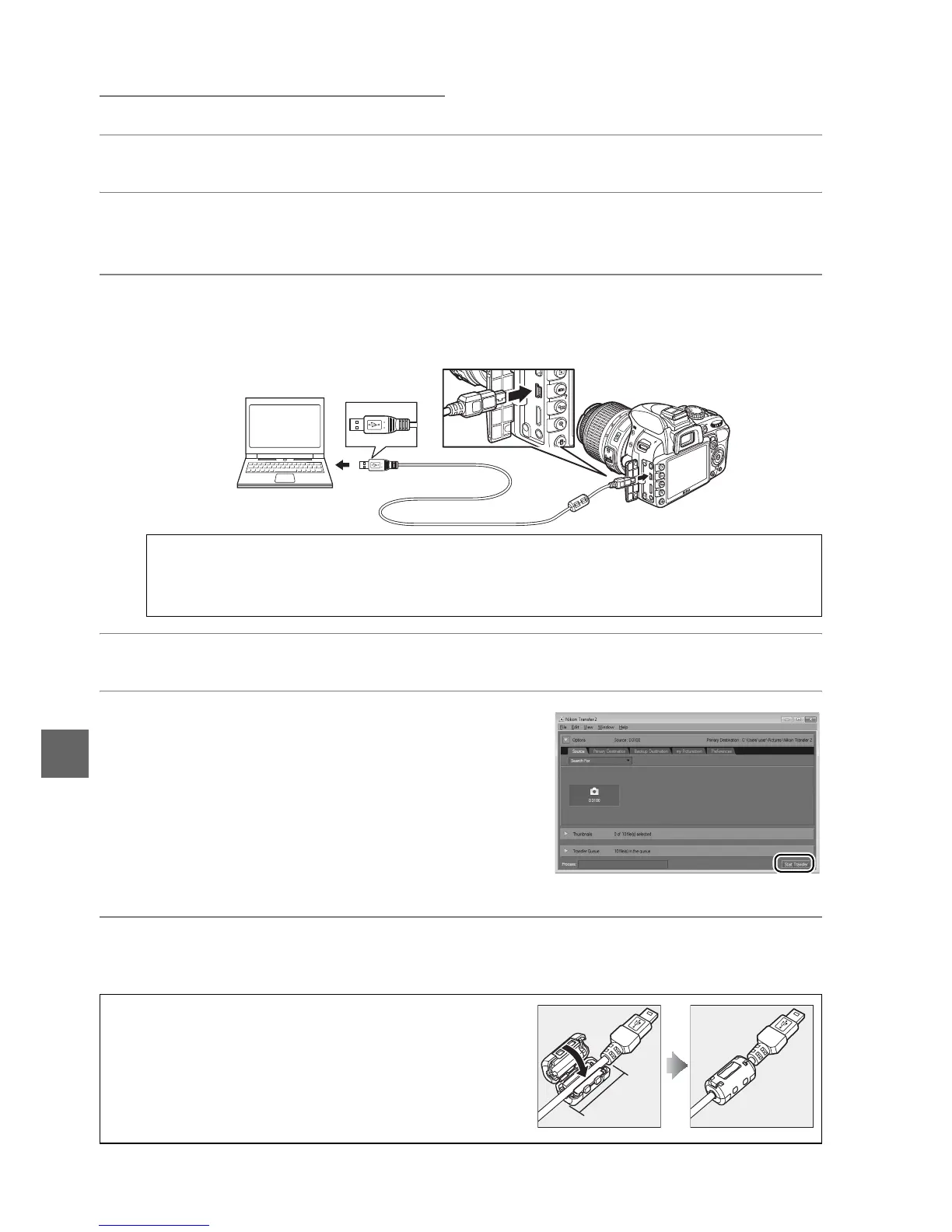
3 Connect the USB cable.
Connect the USB cable as shown.
Do not use force or attempt to insert the
connectors at an angle.
4 Turn the camera on.
5 Transfer photographs.
After following the on-screen instructions to
start Nikon Transfer 2, click the Start Transfer
button to transfer photographs (for more
information on using Nikon Transfer 2, start
ViewNX 2 or Nikon Transfer 2 and select
ViewNX 2 Help from the Help menu).
6 Turn the camera off and disconnect the USB cable when transfer ends.
Nikon Transfer 2 will close automatically when transfer is complete.
D USB Hubs
Connect the camera directly to the computer; do not connect the cable via a USB hub
or keyboard.
A Third-Party USB Cables
When using a third-party USB cable to connect the
camera to a computer, use a cable about 1.5 m (5 ft.)
long with a mini type B connector and attach the
smaller of the supplied ferrite cores (the core for USB
cables) to the USB cable as shown.
Start Transfer button
5 cm/
2 in. or less



 To Next Page