EasyManua.ls Logo

Nikon D3100 - Page 11

Nikon D3100
318 pages
Print Icon
To Next Page IconTo Next Page

To Previous Page IconTo Previous Page
Loading...
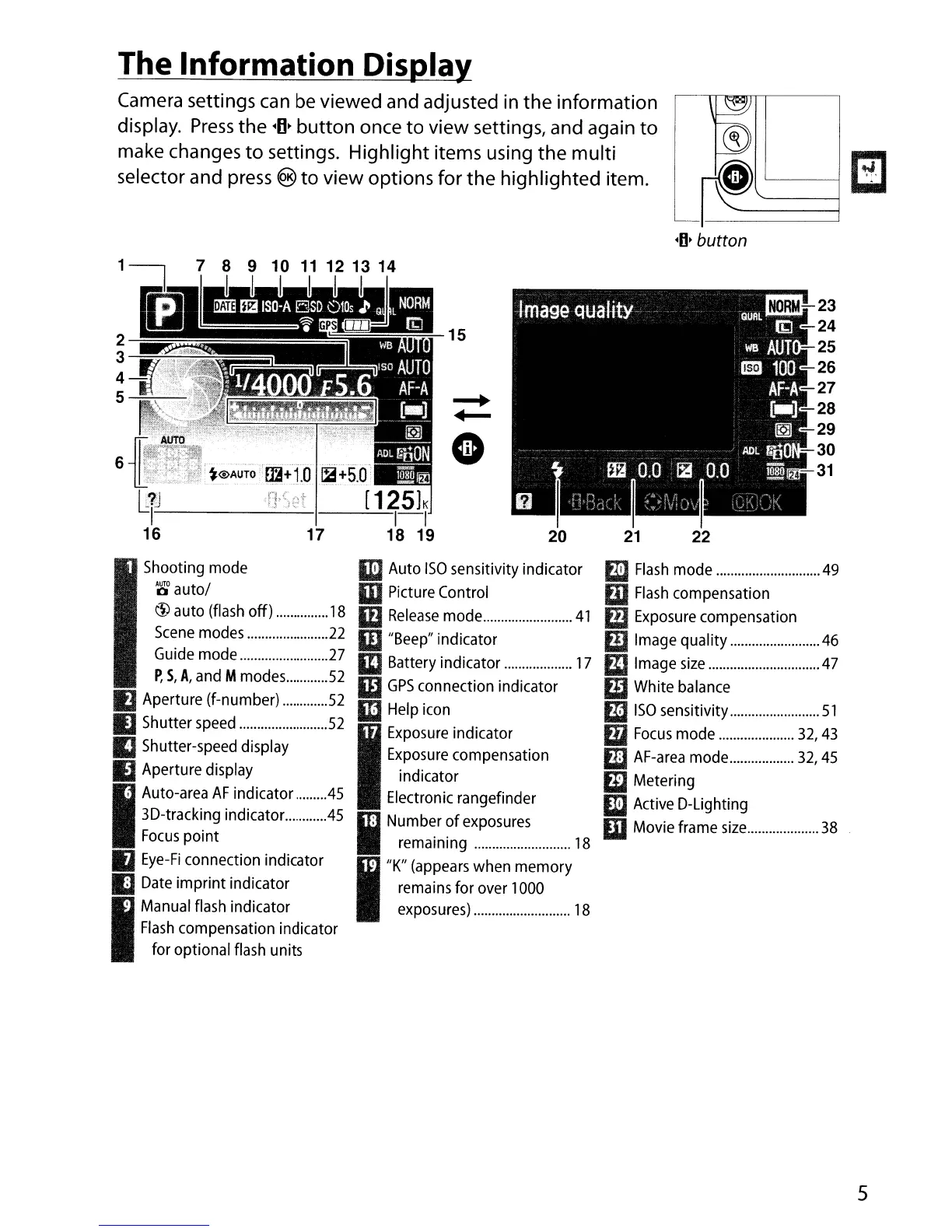
The Information
Dis~
Camera settings
can
be viewed and adjusted
in
the
information
display.
Press
the
~O·
button
once
to
view settings, and again
to
make changes
to
settings. Highlight items using the multi
selector and
press
®
to
view options for
the
highlighted item.
-0'
button
17
fijl~~~
"
~
61l1;r~~i:;~f
~@AuTo<£fA+lo
Ii+S.O
c
li::.-~
~:......::.:,c)...:....:.~t_I_----=--[
1..:....=25h
16
15
Shooting
mode
~
auto/
@ auto
(flash
off)
18
Scene
modes
22
Guide
mode
27
P,
S,
A,
and
M
modes
52
II
Aperture (f-number)
52
IJ
Shutter
speed
52
II
Shutter-speed display
IJ
Aperture display
I
Auto-area
AF
indicator
.45
3D-tracking indicator
45
Focus
point
IJ
Eye-Fi
connection indicator
IJ
Date
imprint indicator
9
Manual
flash
indicator
Flash
compensation indicator
for optional
flash
units
II:)
Auto
ISO
sensitivity indicator
m
Picture
Control
W
Release
mode
41
m
"Beep"
indicator
ID
Battery indicator
17
m
GPS
connection indicator
III
Help
icon
I
Exposure
indicator
Exposure
compensation
indicator
Electronic
rangefinder
II
N~:a~~~~ge~~~~~.~~~
18
I
"K"
(appears
when memory
::;~~:~:~r~.~~~
..
~.~~~
18
II
Flash
mode
49
ED
Flash
compensation
III
Exposure
compensation
m
Image
quality
46
II
Image
size
47
mWhite
balance
1m
ISO
sensitivity
51
m
Focus
mode
32,
43
ED
AF-area
mode
32,45
iii Metering
W
Active
D-Lighting
mMovie frame
size
38
5

Table of Contents

Other manuals for Nikon D3100

Related product manuals