Camera Menus
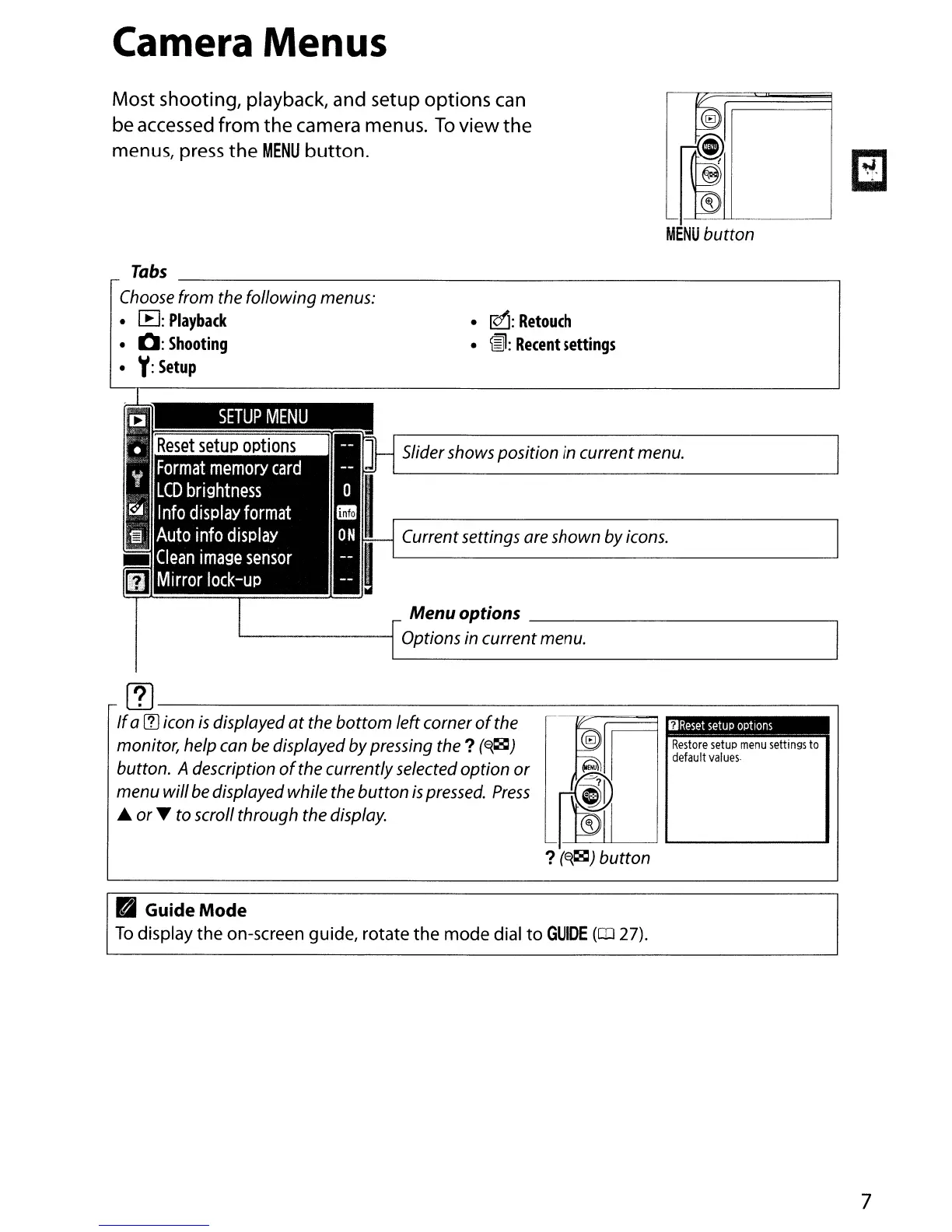
Most shooting, playback, and setup options can
be accessed
from
the camera menus.
To
view
the
menus, press
the
MENU
button.
f@J
~~LL--_------'
MENU
button
•
!Qj:
Retouch
•
~:
Recent
settings
Tabs
_
IChoose from the following menus:
• [B:
Playback
•
0:
Shooting
•
Y:
Setup
SETUP
MENU
Slidershows position in current menu.
Currentsettings are shown by icons.
Menu options
---,
L......
--I
Options in current menu.
Restore
setup
menu
settings
to
default
values·
OReset
setup
options
~
--
- -
~
~
~
~
@)
(iEH0
rm
I~
?
(E{~)
button
~--------------------
If
a
(1J
icon
is
displayed
at
the
bottom
left corner
of
the
monitor, help can
be
displayed bypressing
the?
(E{~)
button. Adescription
of
the currently selected
option
or
menu willbe displayed while the
button
is
pressed.
Press
~
or
~
to scroll through the display.
• Guide Mode
To
display
the
on-screen guide, rotate
the
mode
dial
to
GUIDE
(CD
27).
7



 To Next Page