EasyManua.ls Logo

Nikon D3100 - Page 15

Nikon D3100
318 pages
Print Icon
To Next Page IconTo Next Page

To Previous Page IconTo Previous Page
Loading...
Delete
PLAYBACK
MENU
;\"(
Playback
folder
",:
Display
mode
;~.
Image
review
',§
Rotate
tall
"
Slide
show
f)
Print
set
(OPOFl
tv
D3100
~
ON
OFF
~
a
III
PLAYBACK
MENU
i~
Delete
1M
(~~
Playback
folder
D3100
~'l,
Display
mode
~
~~;
Image
review
ON
;~;,
OFf
Slide
show
~
~
Print
set
(DPOF)
a
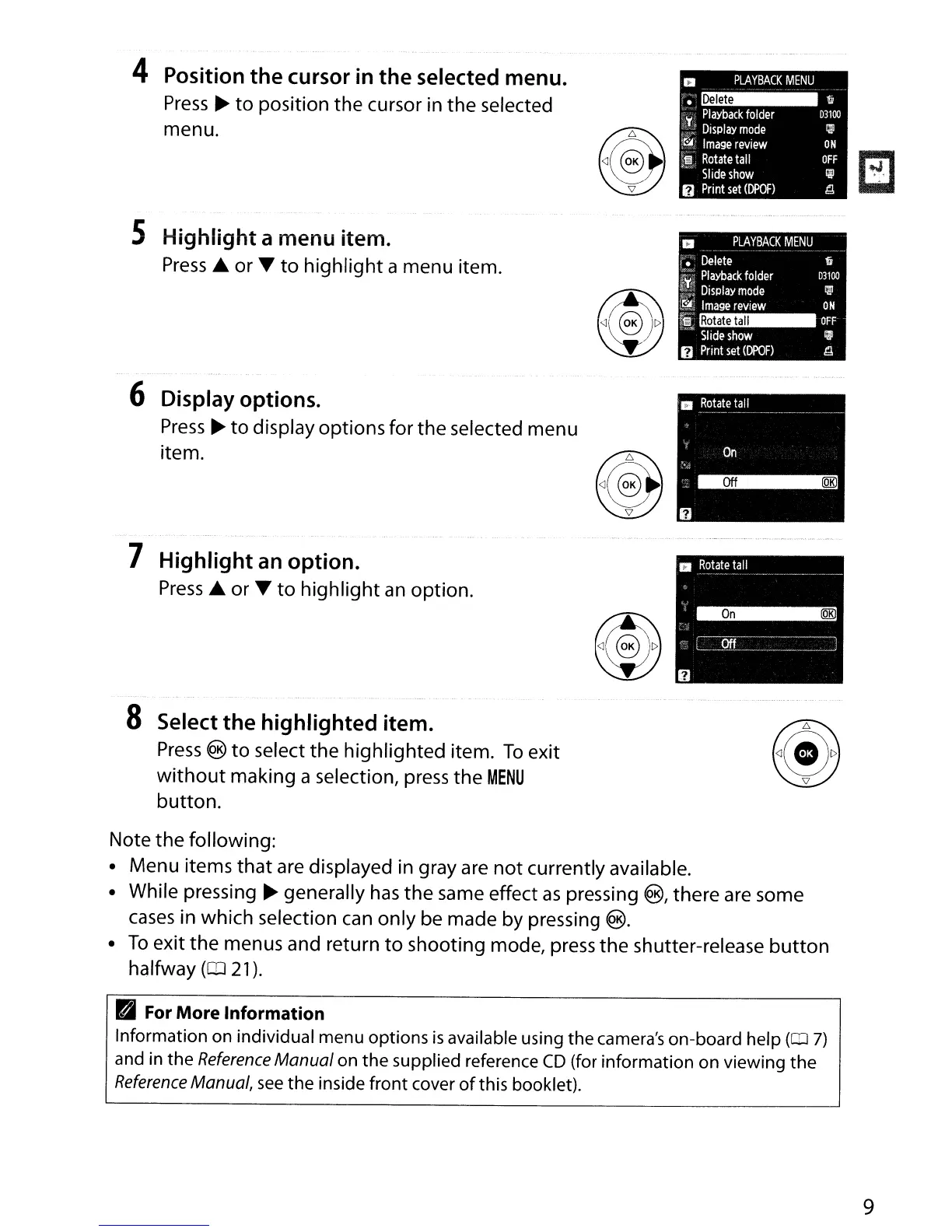
Note
the
following:
Menu items
that
are displayed in gray
are
not
currently available.
While pressing
~
generally
has
the
same effect
as
pressing ®, there are some
cases
in which selection
can
only
be made by pressing ®.
To
exit
the
menus and return
to
shooting mode, press
the
shutter-release
button
halfway (IIJ
21
).
PI
For
More Information
Information on individual menu options
is
available using the camera's on-board help
(OJ
7)
and
in
the
Reference
Manual on
the
supplied reference
CD
(for information on viewing
the
Reference
Manual,
see
the
inside front cover
of
this booklet).
9

Table of Contents

Other manuals for Nikon D3100

Related product manuals