EasyManua.ls Logo

Nikon D3100 - Page 30

Nikon D3100
318 pages
Print Icon
To Next Page IconTo Next Page

To Previous Page IconTo Previous Page
Loading...
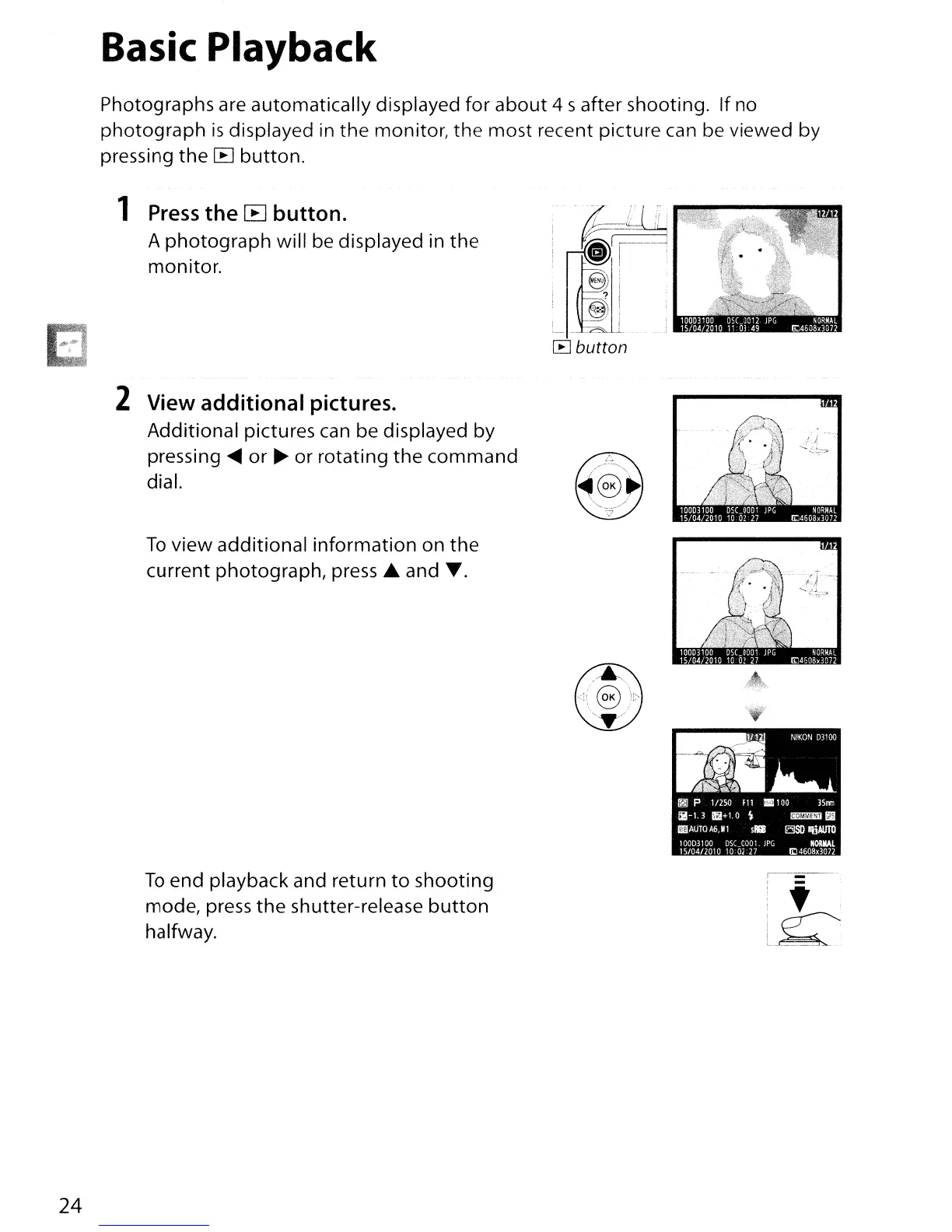
Basic Playback
Photographs are automatically displayed for about 4 s after shooting. If no
photograph
is
displayed
in
the monitor, the most recent picture
can
be viewed by
pressing
the
[B
button.
1
Press
the
[B
button.
A photograph will
be
displayed in the
monitor.
24
2 View additional pictures.
Additional pictures
can
be displayed by
pressing
~
or
~
or rotating
the
command
dial.
To
view additional information on the
current photograph
l
press £ and
.....
To
end playback and return
to
shooting
model
press
the
shutter-release
button
halfway.
.~
~
P 1/25.0
F11
.100
35mm
1i!-1.
3
5+1.
0
~
t!1'il!J!IJlIj llll
I'IJiJAUTO
AG,M1
slRl
ElSIlI!iiAUTO
1
00D31
00
DSCOOOI
lPG
NORMAL
15/0412010 10
02
27
lij
4608,3072
,------
, -
i'
l~

Table of Contents

Other manuals for Nikon D3100

Related product manuals