EasyManua.ls Logo

Nikon D3100 - Page 34

Nikon D3100
318 pages
Print Icon
To Next Page IconTo Next Page

To Previous Page IconTo Previous Page
Loading...
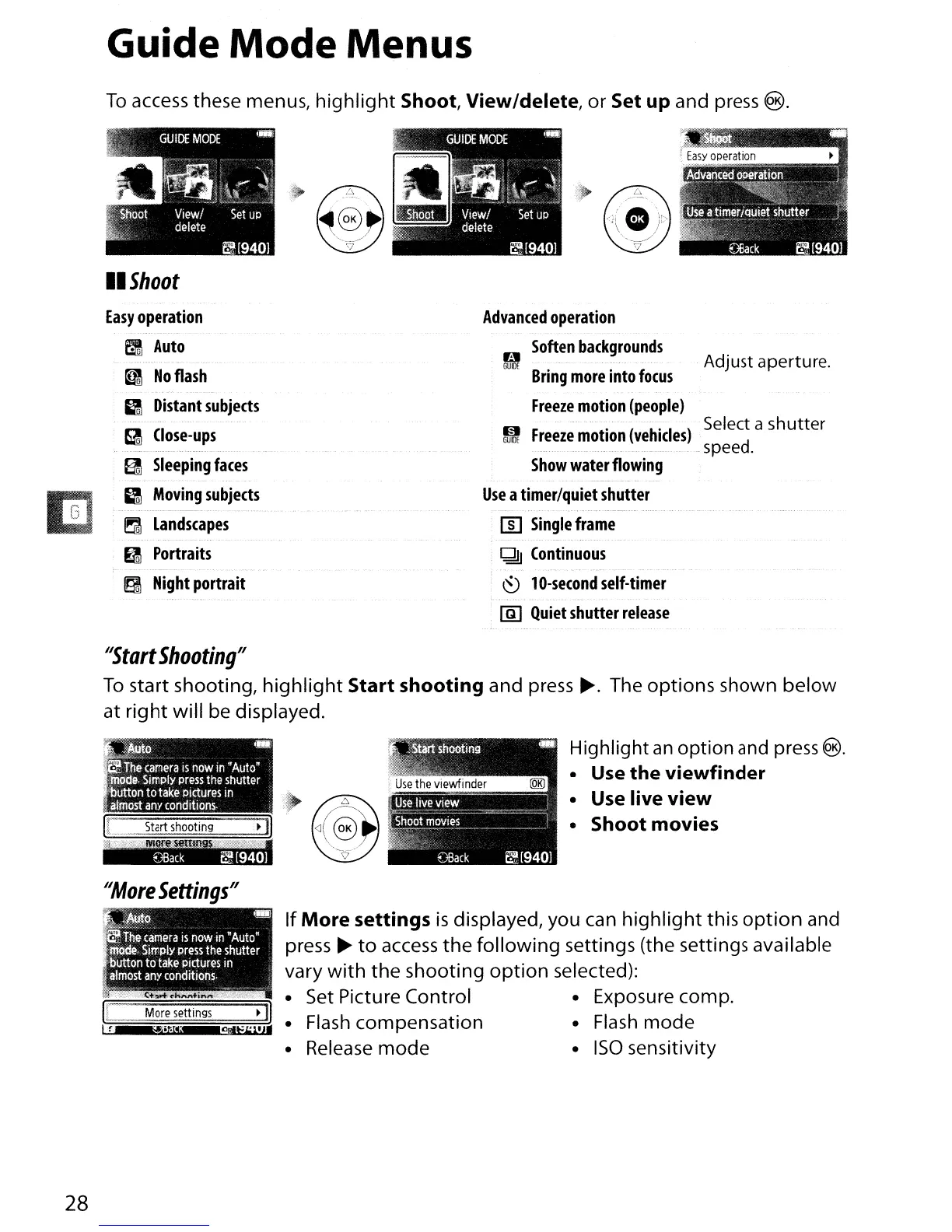
Guide
Mode
Menus
To
access these menus,
highlight
Shoot, View/delete,
or
Set up and press
®.
II
Shoot
Easy
operation
Advanced
operation
f:I
Auto
B
Soften
backgrounds
Adjust aperture.
~
No
flash
GUIDE
Bring
more
into
focus
g
Distant
subjects
Freeze
motion
(people)
9
Close-ups
I§I
Freeze
motion
(vehicles)
Select a
shutter
GUIDE
speed.
EI
Sleeping
faces
Show
water
flowing
g
Moving
subjects
Use
a
timer/quiet
shutter
~
Landscapes
[]]
Single
frame
e
Portraits
Q!)
Continuous
~
Night
portrait
~
10-second
self-timer
lID
Quiet
shutter
release
"Start
Shooting"
To
start shooting,
highlight
Start shooting and
press~.
The options shown below
at
right
will be displayed.
~Q
~
c
The
camera
IS
now
in
"Auto"
il'Wde.
Simply
press
the
shutter
Button
to
take
Pictures
In
almost
any
conditions.
I[
.~.
Start
shooting
II
~wH"nrmm:')'1
"More
Settings"
Highlight
an
option
and
press
@).
Use the viewfinder
Use
live view
Shoot movies
JI~~~.
-
"
The
camera
is
now
in
"Auto"
~.
Simply
press
the
shutter
t'lutton
to
take
pictures
in
almost
any
conditions.
,W"-,,
~
~.~~N
No/
28
Ie
I!
More
settings
11
"!liCIt!;
9tt=.1'
J'
If
More
settings
is
displayed, you can
highlight
this
option
and
press
~
to
access
the
following
settings (the settings available
vary
with
the
shooting
option
selected):
Set
Picture Control Exposure
compo
Flash
compensation
Flash
mode
Release
mode
ISO
sensitivity

Table of Contents

Other manuals for Nikon D3100

Related product manuals