EasyManua.ls Logo

Nikon D3100 - Page 9

Nikon D3100
318 pages
Print Icon
To Next Page IconTo Next Page

To Previous Page IconTo Previous Page
Loading...
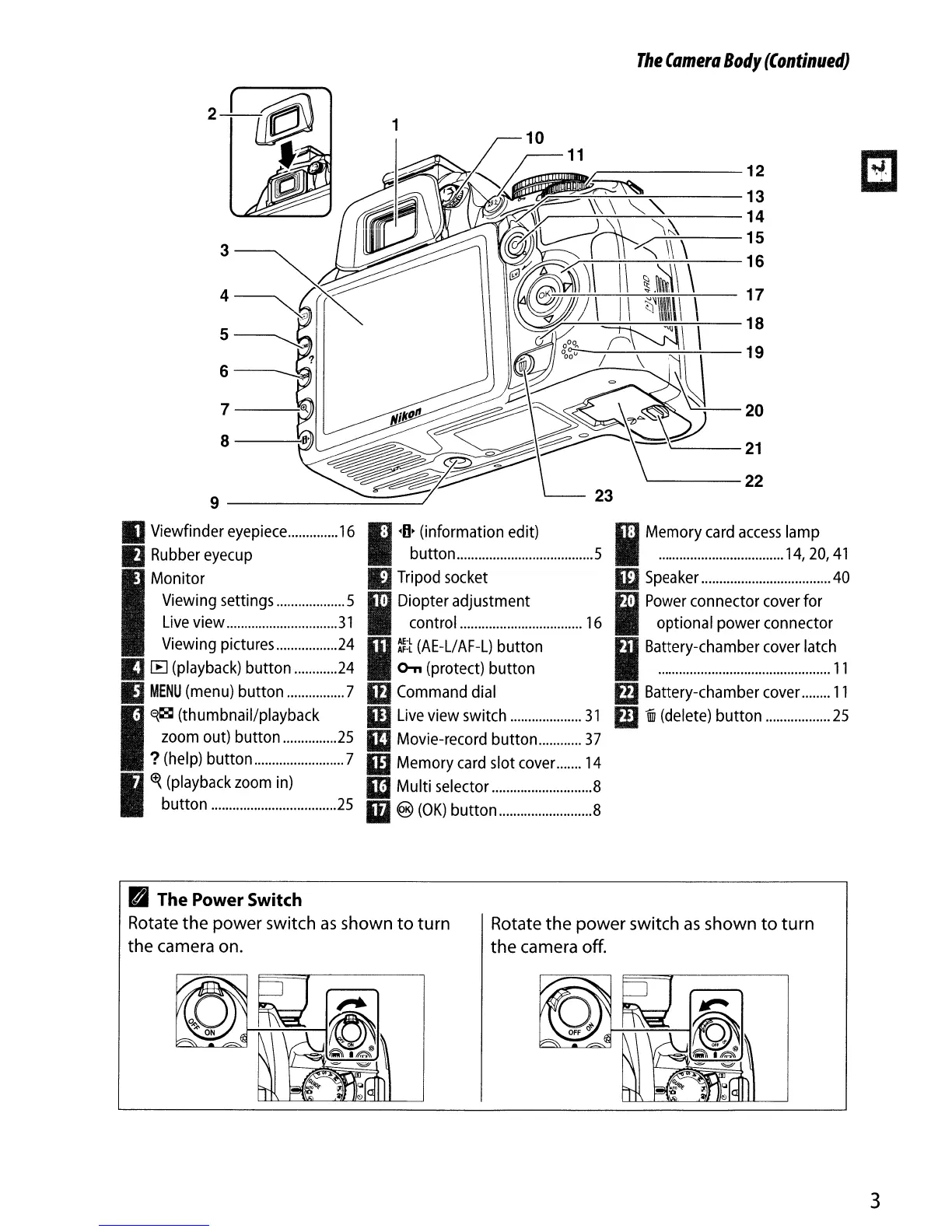
The
Camera
Body
(Continued)
'----21
'-------22
I
M~.~~.~~.~~.~~.~.~~.~~.~.
~a4~iol
41
ID
Speaker
40
ED
Power
connector
cover
for
optional power connector
mBattery-chamber
cover
latch
.................................................
11
III Battery-chamber
cover
11
m
iiii
(delete)
button
25
~------12
~:"7;--,-;-"';-=-~---13
--';-''":-7----''-~---
14
...--':7"7----15
~---i-.;___';__'C:--';---
16
1
I·O~~~~~:.~.~~~~.~.~~~.~
5
IJ
Tripod
socket
I
D~:~~~~~!.~~~.~~.~~
16
III
~~
(AE-L/
AF-L)
button
o-n
(protect) button
m
Command
dial
W
Live
view switch
31
IIIMovie-record button
37
mMemory
card
slot
cover
14
1m
Multi selector 8
Ii
®
(OK)
button 8
7-----;
8------'-
3 ------...
9--------~
IIViewfinder
eyepiece
16
II
Rubber
eyecup
I
Monitor
Viewing
settings
5
Liveview
31
Viewing
pictures
24
III
IE
(playback)
button
24
IJ
MENU
(menu)
button 7
I
~~
(thumbnail/playback
zoom
out) button
25
?
(help)
button 7
I
~~~~~~~~.~.~.~~~.~.~.~.~
25
,.
The
Power
Switch
Rotate
the
power switch as shown
to
turn
the
camera on.
Rotate
the
power switch as shown
to
turn
the
camera
off.
3

Table of Contents

Other manuals for Nikon D3100

Related product manuals