12
Introduction—First Steps
2
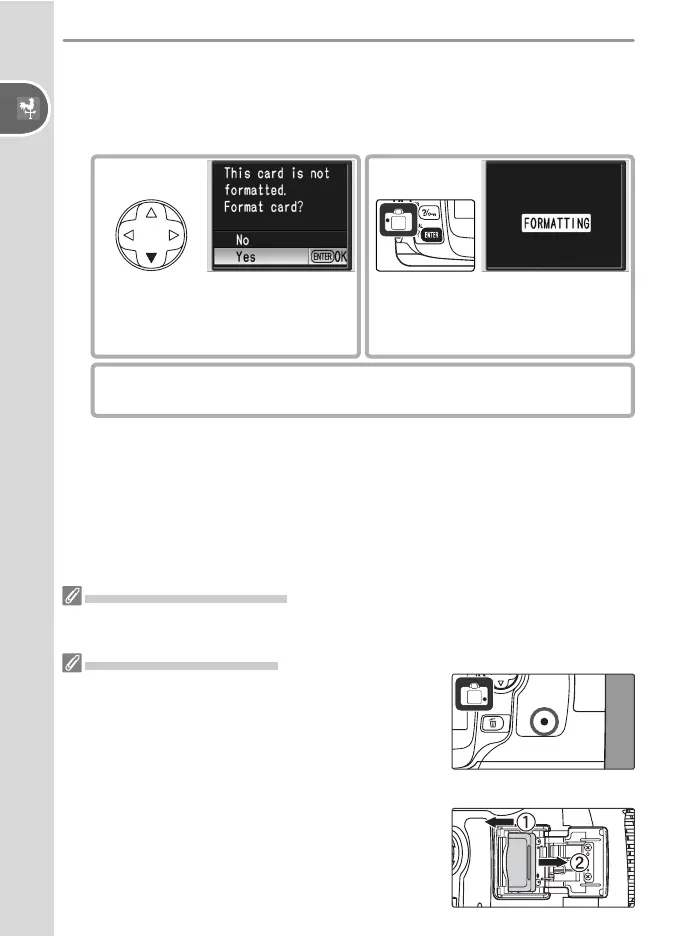
Format the memory card
Formatting memory cards permanently deletes all photographs and
other data they may contain. Be sure all data you wish to keep have
been copied to another storage device before formatting the card.
2
.1
Highlight Yes.
2
.2
Begin formatting. Do not turn
camera off or remove battery or
memory card until formatting is
complete.
2
.3
Monitor turns off when formatting is complete.
Formatting Memory Cards
Use the camera Format option to format memory cards. Performance may drop if
cards are formatted in a computer.
Removing Memory Cards
1 Confi rm that the access lamp is off.
2 Turn the camera off and open the memory card slot cover.
3 Press the card in to eject (
햲
). The card can then be
removed by hand (
햳
).



 To Next Page