71
Basic Camera Settings: The Setup MenuSetup
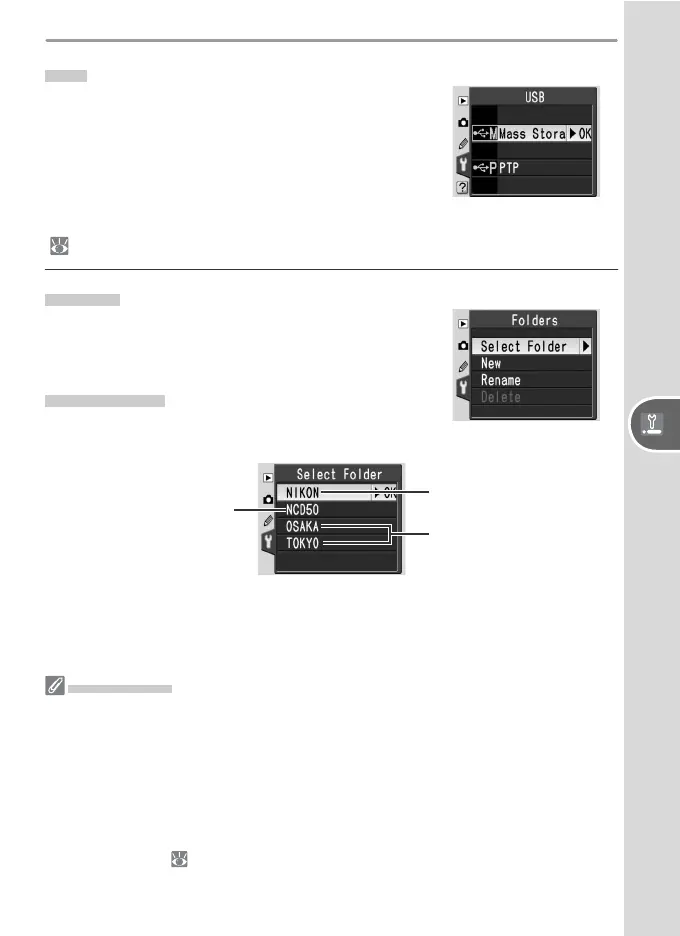
USB
Choose a USB option for connection to a com-
puter or PictBridge printer. Choose PTP when
connecting to a PictBridge printer or using the
Camera Control function in Nikon Capture 4
version 4.3 (available separately). See “Viewing
Photographs on a Computer” for information on
selecting a USB option for use with PictureProject
(
59).
Folders
Create, rename, or delete folders and to choose
the folder in which new photographs will be
stored.
Select Folder
Choose the folder in which subsequent images
will be stored.
Current folder
NCD50 (default folder)
Other folders
(in alphabetical order)
Folder Names
On the memory card, folder names are preceded by a three-digit folder number as-
signed automatically by the camera (e.g., 100NCD50) Each folder can contain up
to 999 photographs. If a photograph is taken when the current folder contains 999
fi les or a picture numbered 9999, the camera will create a new folder by adding one
to the current folder number (e.g., 101NCD50). For the purposes of selection and
naming, all folders with the same name are treated as the same folder. For example,
if the folder NIKON is selected, pictures in all folders named NIKON (100NIKON,
101NIKON, 102NIKON, etc.) will be visible when Current is selected in the Play-
back Fldr menu ( 84). Renaming similarly applies to all folders with the same
name. During shooting, pictures are stored in the highest-numbered folder with the
selected name.



 To Next Page